0.0 | Introduction
0.0 | Introduction
0.0 | Introduction
Streamlining collaboration through board games on real-world challenges
Streamlining collaboration through board games on real-world challenges
Streamlining collaboration through board games on real-world challenges
Streamlining collaboration through board games on real-world challenges
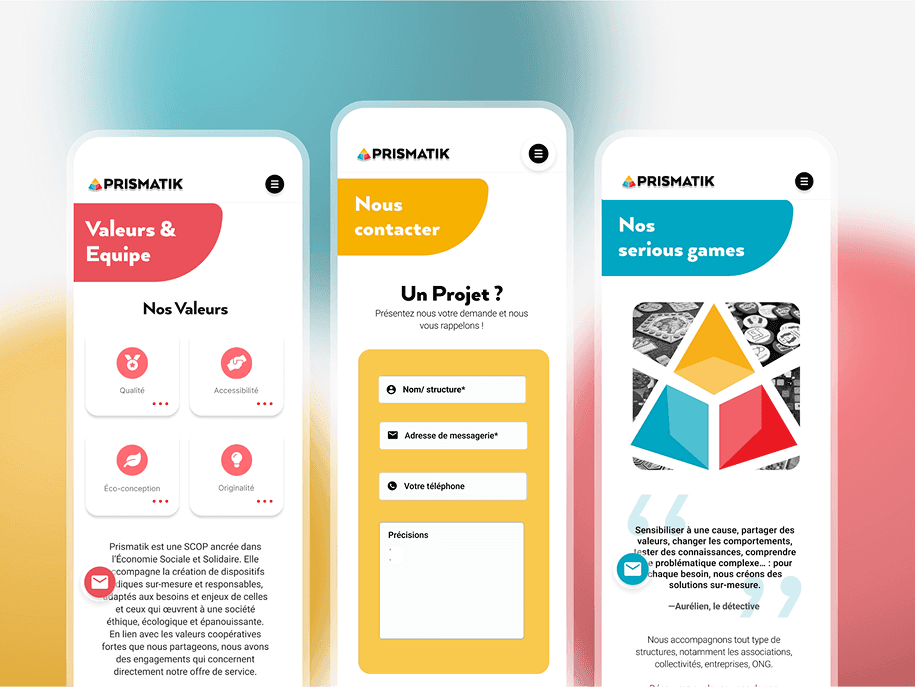
Prismatik is a small France-based business specialising in serious games. For this project my focus was to redesign Prismatik’s mobile-to-desktop website to help business owners collaborate with them in creating customised board games that address real-world issues.
Prismatik is a small France-based business specialising in serious games. For this project my focus was to redesign Prismatik’s mobile-to-desktop website to help business owners collaborate with them in creating customised board games that address real-world issues.
Prismatik is a small France-based business specialising in serious games. For this project my focus was to redesign Prismatik’s mobile-to-desktop website to help business owners collaborate with them in creating customised board games that address real-world issues.
Prismatik is a small France-based business specialising in serious games. For this project my focus was to redesign Prismatik’s mobile-to-desktop website to help business owners collaborate with them in creating customised board games that address real-world issues.
0.1 | Overview
Role
Lead UI/UX Designer
Team
Peer collaboration
3-person team
Goal
Mobile first site (Ironhack UX/UI Design Certification)
0.2 | Statements
Problem
Existing users found Prismatik’s mobile website difficult to navigate and visually inconsistent. This led to reduced engagement and made it harder for businesses to understand Prismatik’s services.
Solution
In a team, redesigned the website into a responsive, interactive platform with clear navigation and a cohesive visual identity. The new design improves usability, increases engagement, and highlights Prismatik’s core values.
0.1 | Overview
Role
Lead UI/UX Designer
Team
Peer collaboration
3-person team
Goal
Mobile first site (Ironhack UX/UI Design Certification)
0.2 | Statements
Problem
Existing users found Prismatik’s mobile website difficult to navigate and visually inconsistent. This led to reduced engagement and made it harder for businesses to understand Prismatik’s services.
Solution
In a team, redesigned the website into a responsive, interactive platform with clear navigation and a cohesive visual identity. The new design improves usability, increases engagement, and highlights Prismatik’s core values.
0.1 | Overview
Role
Lead UI/UX Designer
Team
Peer collaboration
3-person team
Goal
Mobile first site (Ironhack UX/UI Design Certification)
0.2 | Statements
Problem
Existing users found Prismatik’s mobile website difficult to navigate and visually inconsistent. This led to reduced engagement and made it harder for businesses to understand Prismatik’s services.
Solution
In a team, redesigned the website into a responsive, interactive platform with clear navigation and a cohesive visual identity. The new design improves usability, increases engagement, and highlights Prismatik’s core values.
0.1 | Overview
Role
Lead UI/UX Designer
Team
Peer collaboration
3-person team
Goal
Mobile first site (Ironhack UX/UI Design Certification)
0.2 | Statements
Problem
Existing users found Prismatik’s mobile website difficult to navigate and visually inconsistent. This led to reduced engagement and made it harder for businesses to understand Prismatik’s services.
Solution
In a team, redesigned the website into a responsive, interactive platform with clear navigation and a cohesive visual identity. The new design improves usability, increases engagement, and highlights Prismatik’s core values.
0.1 | Overview
Role
Lead UI/UX Designer
Team
Peer collaboration
3-person team
Goal
Mobile first site (Ironhack UX/UI Design Certification)
0.2 | Statements
Problem
Existing users found Prismatik’s mobile website difficult to navigate and visually inconsistent. This led to reduced engagement and made it harder for businesses to understand Prismatik’s services.
Solution
In a team, redesigned the website into a responsive, interactive platform with clear navigation and a cohesive visual identity. The new design improves usability, increases engagement, and highlights Prismatik’s core values.
0.1 | Overview
Role
Lead UI/UX Designer
Team
Peer collaboration
3-person team
Goal
Mobile first site (Ironhack UX/UI Design Certification)
0.2 | Statements
Problem
Existing users found Prismatik’s mobile website difficult to navigate and visually inconsistent. This led to reduced engagement and made it harder for businesses to understand Prismatik’s services.
Solution
In a team, redesigned the website into a responsive, interactive platform with clear navigation and a cohesive visual identity. The new design improves usability, increases engagement, and highlights Prismatik’s core values.
0.3 | Design Process
0.3 | Design Process
0.3 | Design Process
Design Thinking to Double Diamond
Design Thinking to Double Diamond
Design Thinking to Double Diamond
Design Thinking to Double Diamond
Adapted agile design thinking process into this framework to redesign a mobile version of the website to complement Prismatik’s audience and the brand’s style and attributes.
Adapted agile design thinking process into this framework to redesign a mobile version of the website to complement Prismatik’s audience and the brand’s style and attributes.
Adapted agile design thinking process into this framework to redesign a mobile version of the website to complement Prismatik’s audience and the brand’s style and attributes.
Adapted agile design thinking process into this framework to redesign a mobile version of the website to complement Prismatik’s audience and the brand’s style and attributes.
1.0 | Discover
Understanding users and uncovering pain points
Desk research and interviews showed three key insights:
1
Too much text overwhelmed the French business owners, making it hard to grasp what to do next.
2
Navigation felt unclear, so the French business owners weren’t sure where to start a project.
3
Visual hierarchy didn’t guide scanning, burying important actions and proof points.

SNAG
These findings revealed a deeper usability issue — the existing mobile site wasn’t effectively guiding or engaging the French business owners, setting the stage for the next phase: define.
1.0 | Discover
Understanding users and uncovering pain points
Desk research and interviews showed three key insights:
1
Too much text overwhelmed the French business owners, making it hard to grasp what to do next.
2
Navigation felt unclear, so the French business owners weren’t sure where to start a project.
3
Visual hierarchy didn’t guide scanning, burying important actions and proof points.
SNAG
These findings revealed a deeper usability issue — the existing mobile site wasn’t effectively guiding or engaging the French business owners, setting the stage for the next phase: define.
1.0 | Discover
Understanding users and uncovering pain points
Desk research and interviews showed three key insights:
1
Too much text overwhelmed the French business owners, making it hard to grasp what to do next.
2
Navigation felt unclear, so the French business owners weren’t sure where to start a project.
3
Visual hierarchy didn’t guide scanning, burying important actions and proof points.
SNAG
These findings revealed a deeper usability issue — the existing mobile site wasn’t effectively guiding or engaging the French business owners, setting the stage for the next phase: define.
1.0 | Discover
Understanding users and uncovering pain points
Desk research and interviews showed three key insights:
1
Too much text overwhelmed the French business owners, making it hard to grasp what to do next.
2
Navigation felt unclear, so the French business owners weren’t sure where to start a project.
3
Visual hierarchy didn’t guide scanning, burying important actions and proof points.
SNAG
These findings revealed a deeper usability issue — the existing mobile site wasn’t effectively guiding or engaging the French business owners, setting the stage for the next phase: define.
1.0 | Discover
Understanding users and uncovering pain points
Desk research and interviews showed three key insights:
1
Too much text overwhelmed the French business owners, making it hard to grasp what to do next.
2
Navigation felt unclear, so the French business owners weren’t sure where to start a project.
3
Visual hierarchy didn’t guide scanning, burying important actions and proof points.
SNAG
These findings revealed a deeper usability issue — the existing mobile site wasn’t effectively guiding or engaging the French business owners, setting the stage for the next phase: define.
1.0 | Discover
Understanding users and uncovering pain points
Desk research and interviews showed three key insights:
1
Too much text overwhelmed the French business owners, making it hard to grasp what to do next.
2
Navigation felt unclear, so the French business owners weren’t sure where to start a project.
3
Visual hierarchy didn’t guide scanning, burying important actions and proof points.

SNAG
These findings revealed a deeper usability issue — the existing mobile site wasn’t effectively guiding or engaging the French business owners, setting the stage for the next phase: define.
1.1 | Secondary research
Heuristic analysis on current site
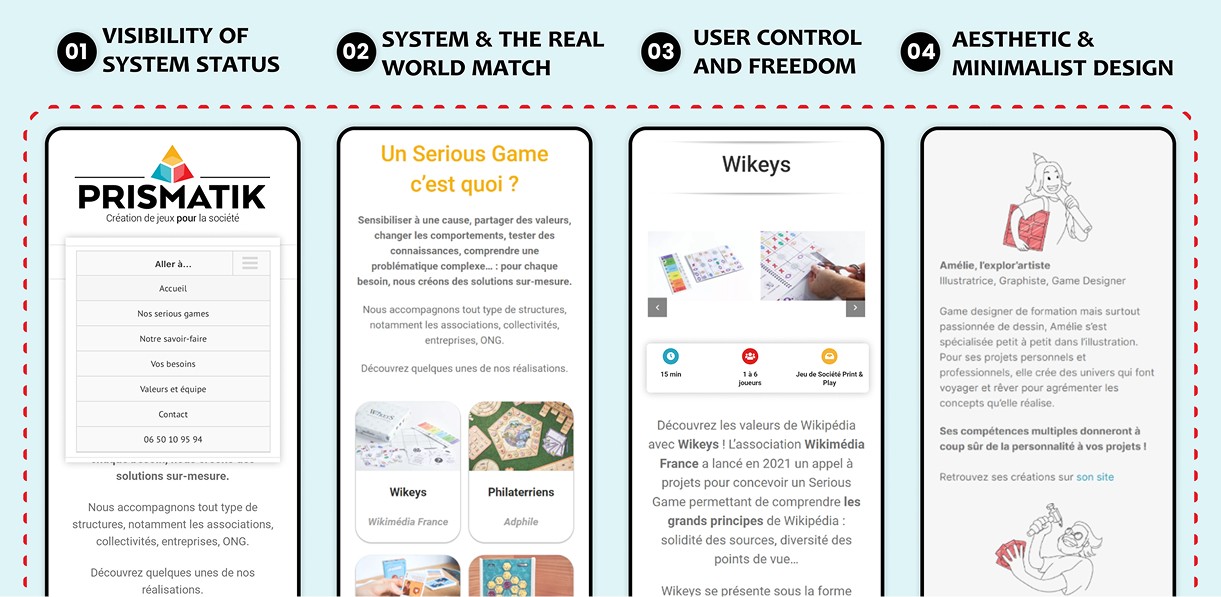
We reviewed Prismatik’s existing mobile-first website using Nielsen’s heuristics to identify usability gaps. The analysis highlighted issues with content hierarchy, visual consistency, and user control, shaping key design priorities for the next stages.
Site mapping the current site
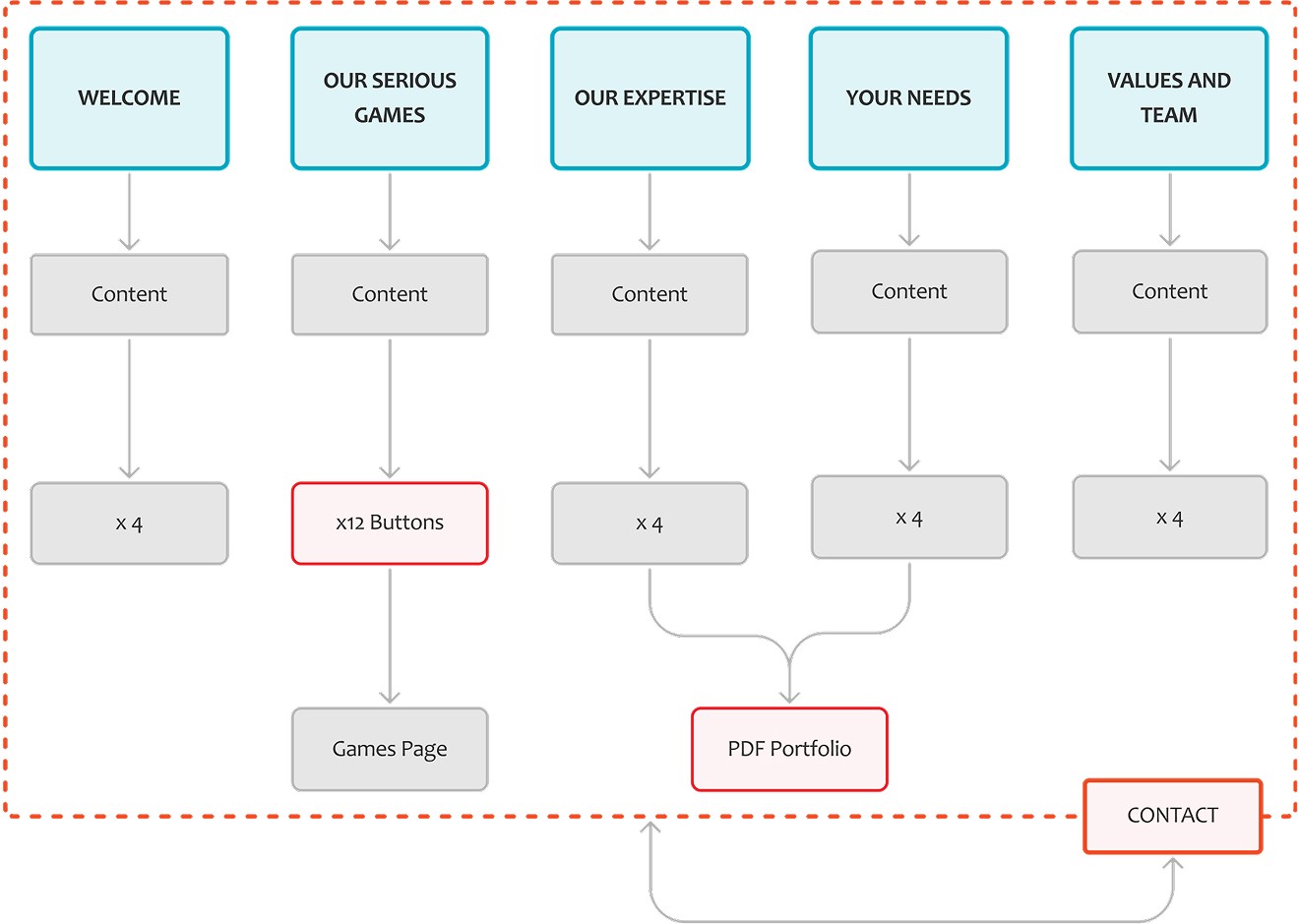
Each team member created a sitemap and then came together to merge them into one unified version. This process revealed redundancies and missing pathways, helping us define a more efficient and intuitive navigation system.
Comparative analysis
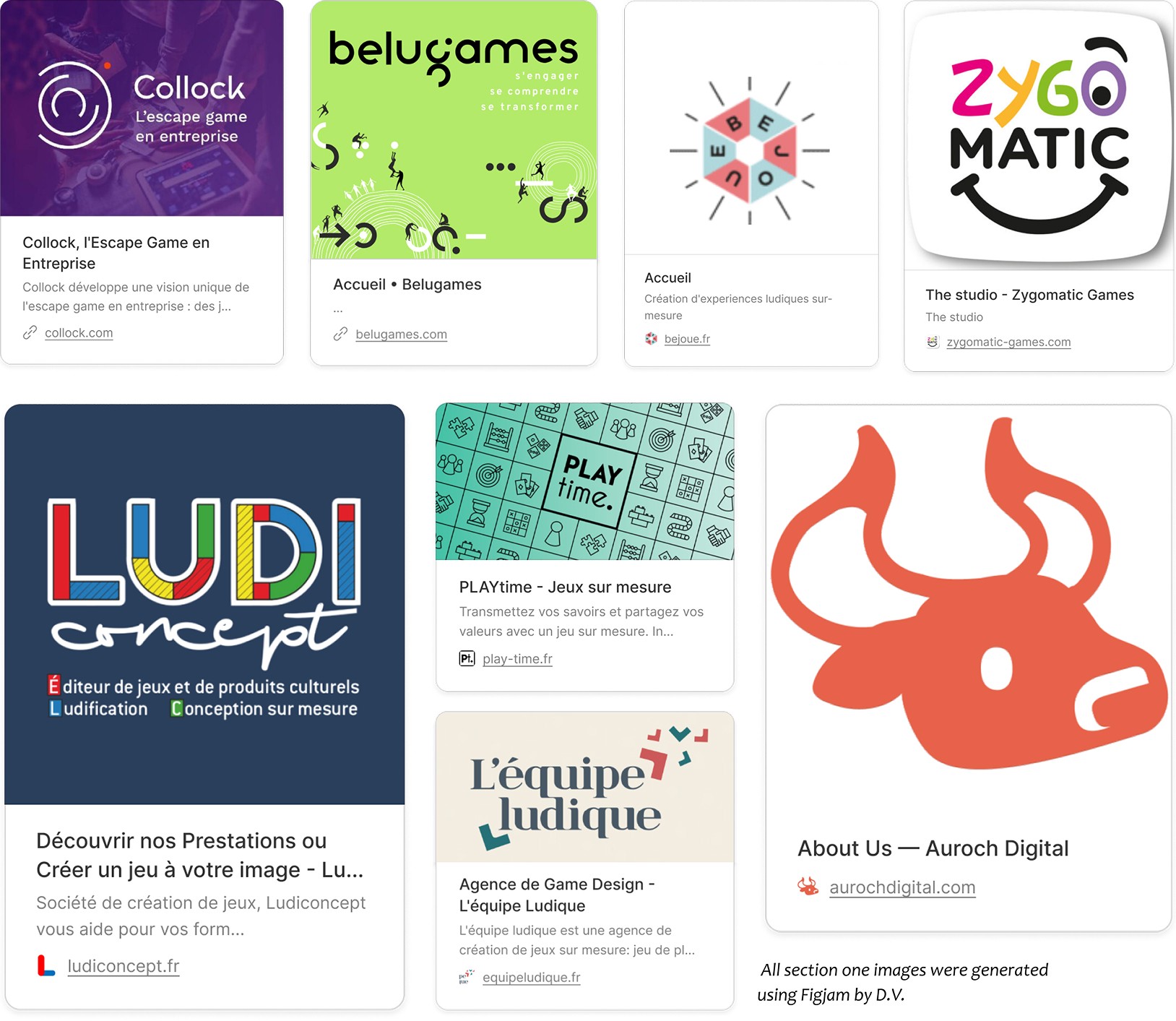
Each team member researched B2B websites with similar models, from game studios to learning platforms. The findings informed our decisions on layout, onboarding flow, and how to present Prismatik’s unique value within a creative yet professional context.
1.1 | Secondary research
Heuristic analysis on current site
We reviewed Prismatik’s existing mobile-first website using Nielsen’s heuristics to identify usability gaps. The analysis highlighted issues with content hierarchy, visual consistency, and user control, shaping key design priorities for the next stages.
Site mapping the current site
Each team member created a sitemap and then came together to merge them into one unified version. This process revealed redundancies and missing pathways, helping us define a more efficient and intuitive navigation system.
Comparative analysis
Each team member researched B2B websites with similar models, from game studios to learning platforms. The findings informed our decisions on layout, onboarding flow, and how to present Prismatik’s unique value within a creative yet professional context.
1.1 | Secondary research
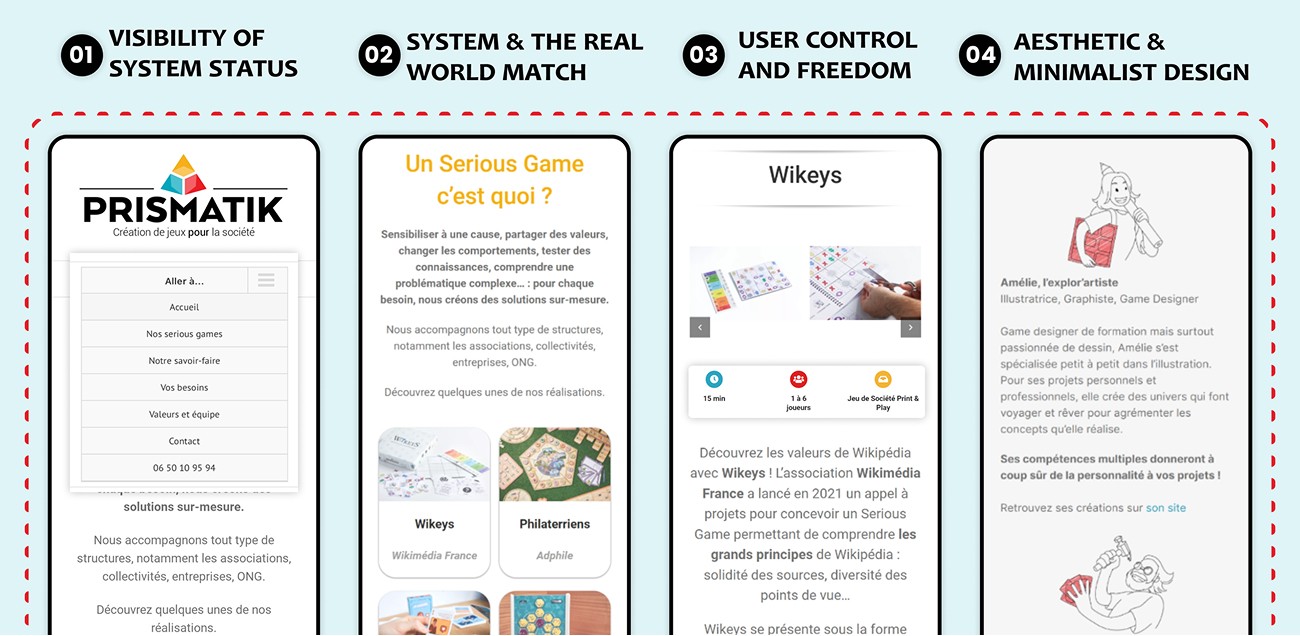
Heuristic analysis on current site
We reviewed Prismatik’s existing mobile-first website using Nielsen’s heuristics to identify usability gaps. The analysis highlighted issues with content hierarchy, visual consistency, and user control, shaping key design priorities for the next stages.
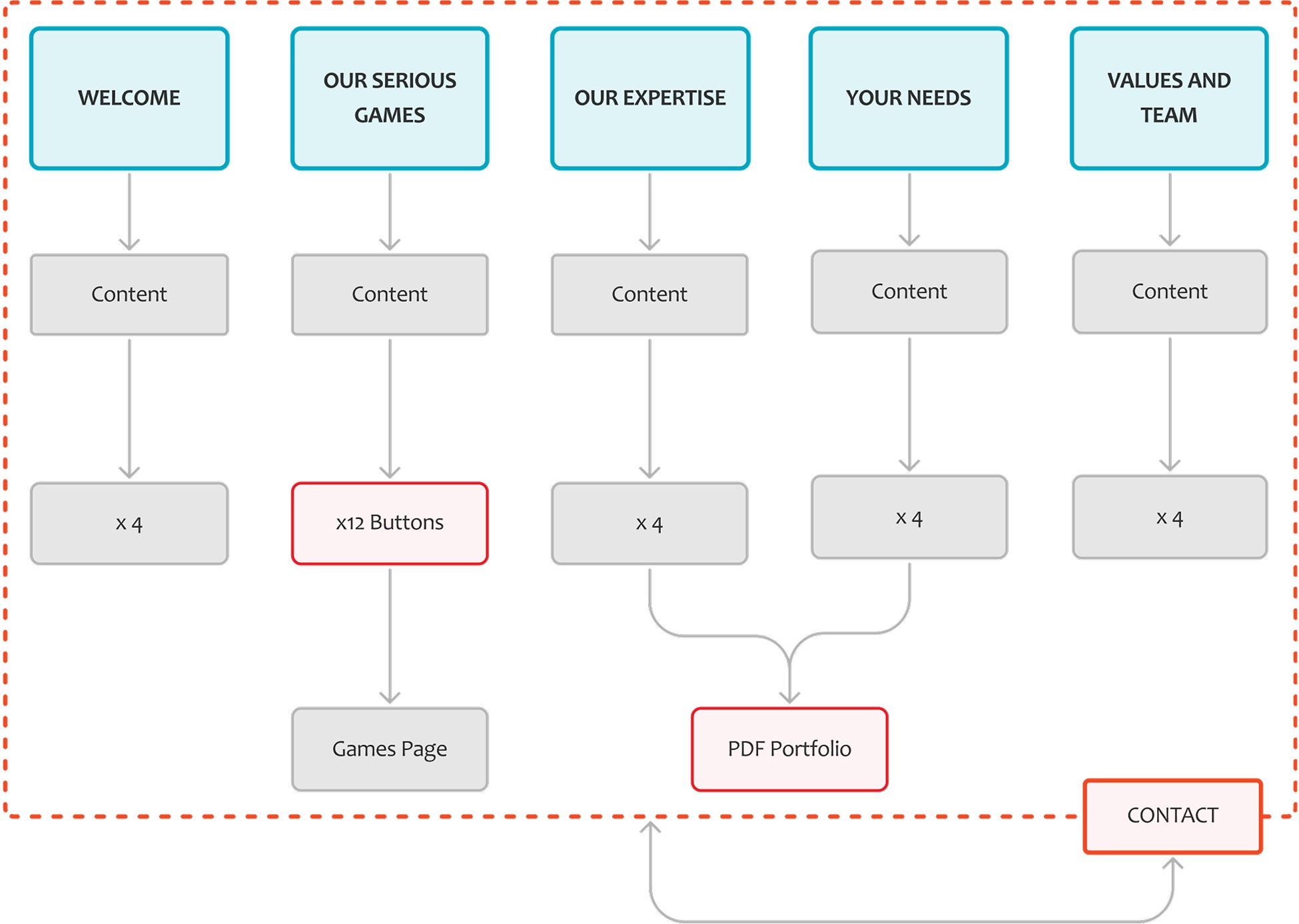
Site mapping the current site
Each team member created a sitemap and then came together to merge them into one unified version. This process revealed redundancies and missing pathways, helping us define a more efficient and intuitive navigation system.
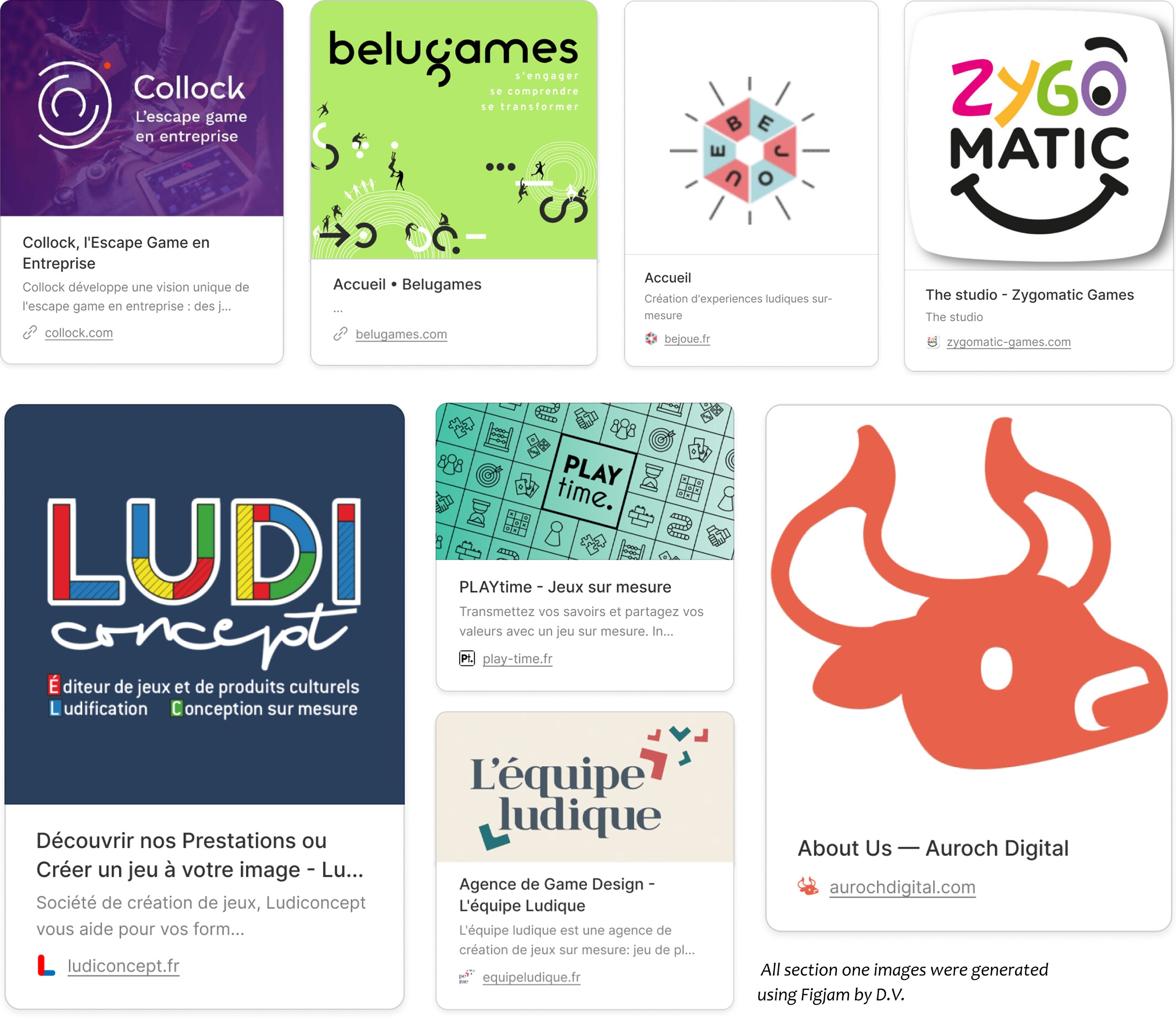
Comparative analysis
Each team member researched B2B websites with similar models, from game studios to learning platforms. The findings informed our decisions on layout, onboarding flow, and how to present Prismatik’s unique value within a creative yet professional context.
1.1 | Secondary research
Heuristic analysis on live site
We reviewed Prismatik’s existing mobile-first website using Nielsen’s heuristics to identify usability gaps. The analysis highlighted issues with content hierarchy, visual consistency, and user control, shaping key design priorities for the next stages.
Site mapping the current site
Each team member created a sitemap and then came together to merge them into one unified version. This process revealed redundancies and missing pathways, helping us define a more efficient and intuitive navigation system.
Comparative analysis
Each team member researched B2B websites with similar models, from game studios to learning platforms. The findings informed our decisions on layout, onboarding flow, and how to present Prismatik’s unique value within a creative yet professional context.
1.1 | Secondary research
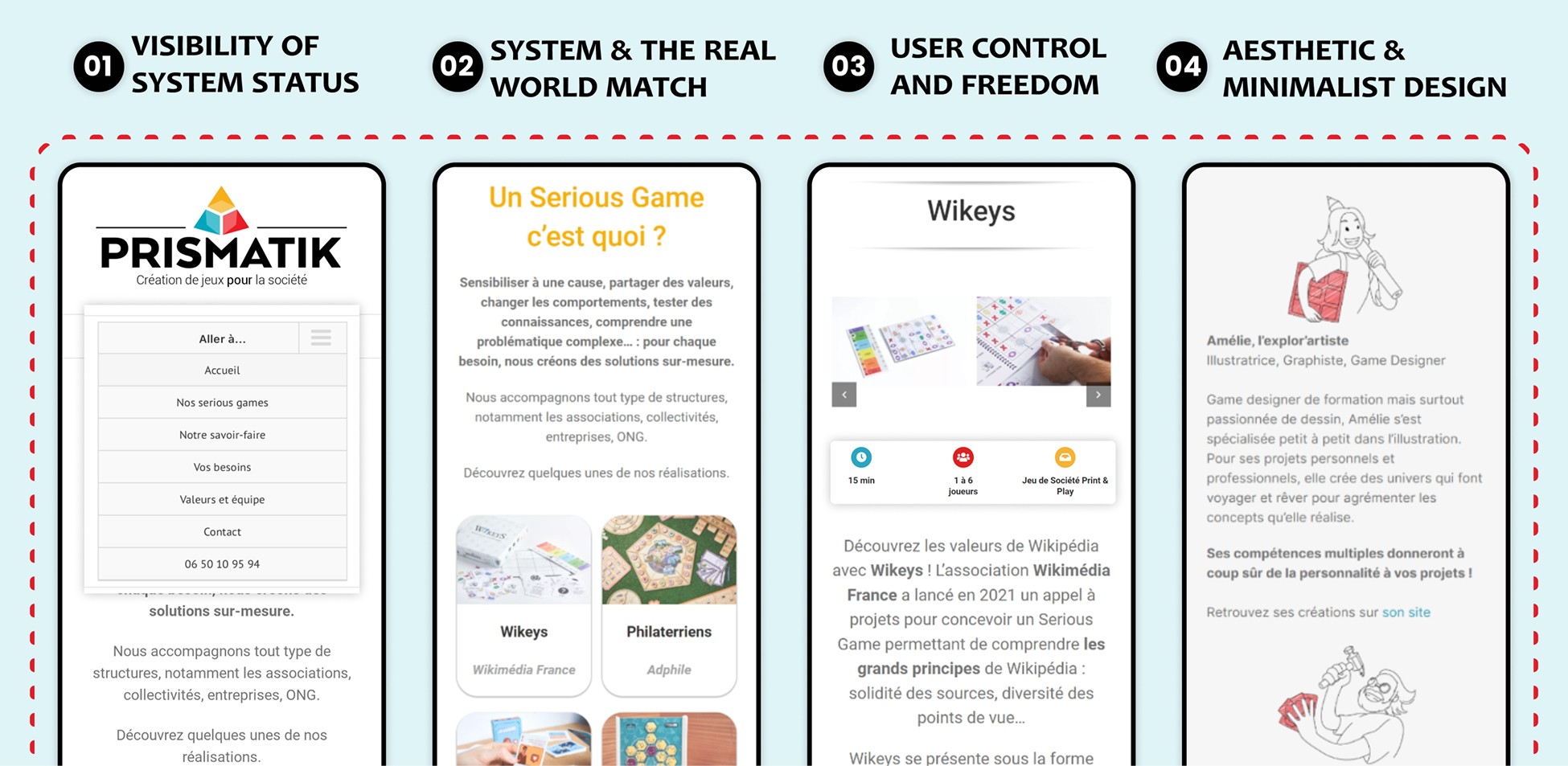
Heuristic analysis on current site
We reviewed Prismatik’s existing mobile-first website using Nielsen’s heuristics to identify usability gaps. The analysis highlighted issues with content hierarchy, visual consistency, and user control, shaping key design priorities for the next stages.
Site mapping the current site
Each team member created a sitemap and then came together to merge them into one unified version. This process revealed redundancies and missing pathways, helping us define a more efficient and intuitive navigation system.
Comparative analysis
Each team member researched B2B websites with similar models, from game studios to learning platforms. The findings informed our decisions on layout, onboarding flow, and how to present Prismatik’s unique value within a creative yet professional context.
1.1 | Secondary research
Heuristic analysis on current site
We reviewed Prismatik’s existing mobile-first website using Nielsen’s heuristics to identify usability gaps. The analysis highlighted issues with content hierarchy, visual consistency, and user control, shaping key design priorities for the next stages.
Site mapping the current site
Each team member created a sitemap and then came together to merge them into one unified version. This process revealed redundancies and missing pathways, helping us define a more efficient and intuitive navigation system.
Comparative analysis
Each team member researched B2B websites with similar models, from game studios to learning platforms. The findings informed our decisions on layout, onboarding flow, and how to present Prismatik’s unique value within a creative yet professional context.
1.2 | Primary research
3 pain points that should be considered
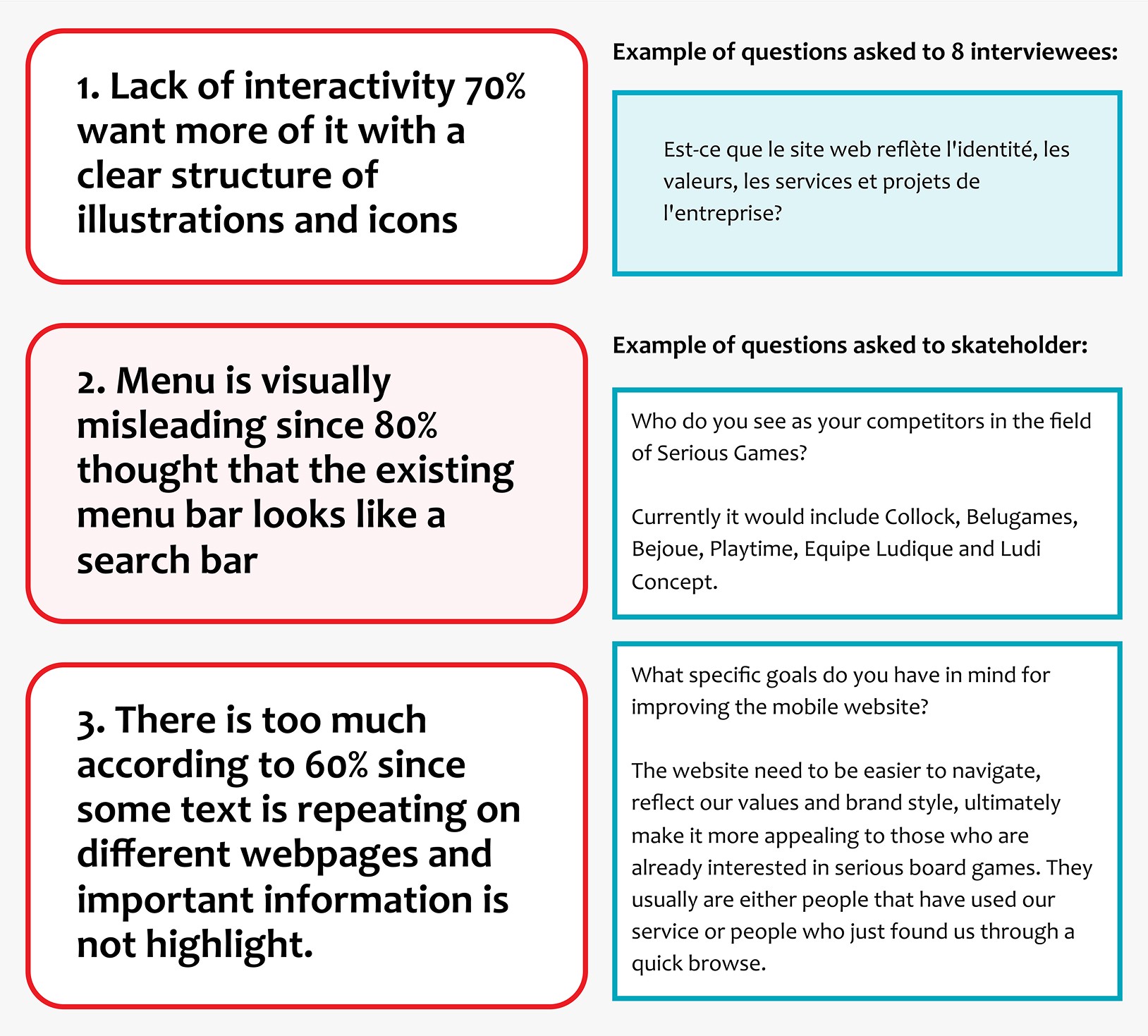
We gained rich qualitative data by interviewing eight users of the existing Prismatik website, as well as French-speaking participants. The first interview with Aurélien Lefrancois, the founder of Prismatik, helped us narrow the findings to three key pain points:
1. limited interactivity and unclear visual structure,
2. a misleading menu design, and
3. repetitive content that buried important information.
1.2 | Primary research
3 pain points that should be considered
We gained rich qualitative data by interviewing eight users of the existing Prismatik website, as well as French-speaking participants. The first interview with Aurélien Lefrancois, the founder of Prismatik, helped us narrow the findings to three key pain points:
1. limited interactivity and unclear visual structure,
2. a misleading menu design, and
3. repetitive content that buried important information.
1.2 | Primary research
3 pain points that should be considered
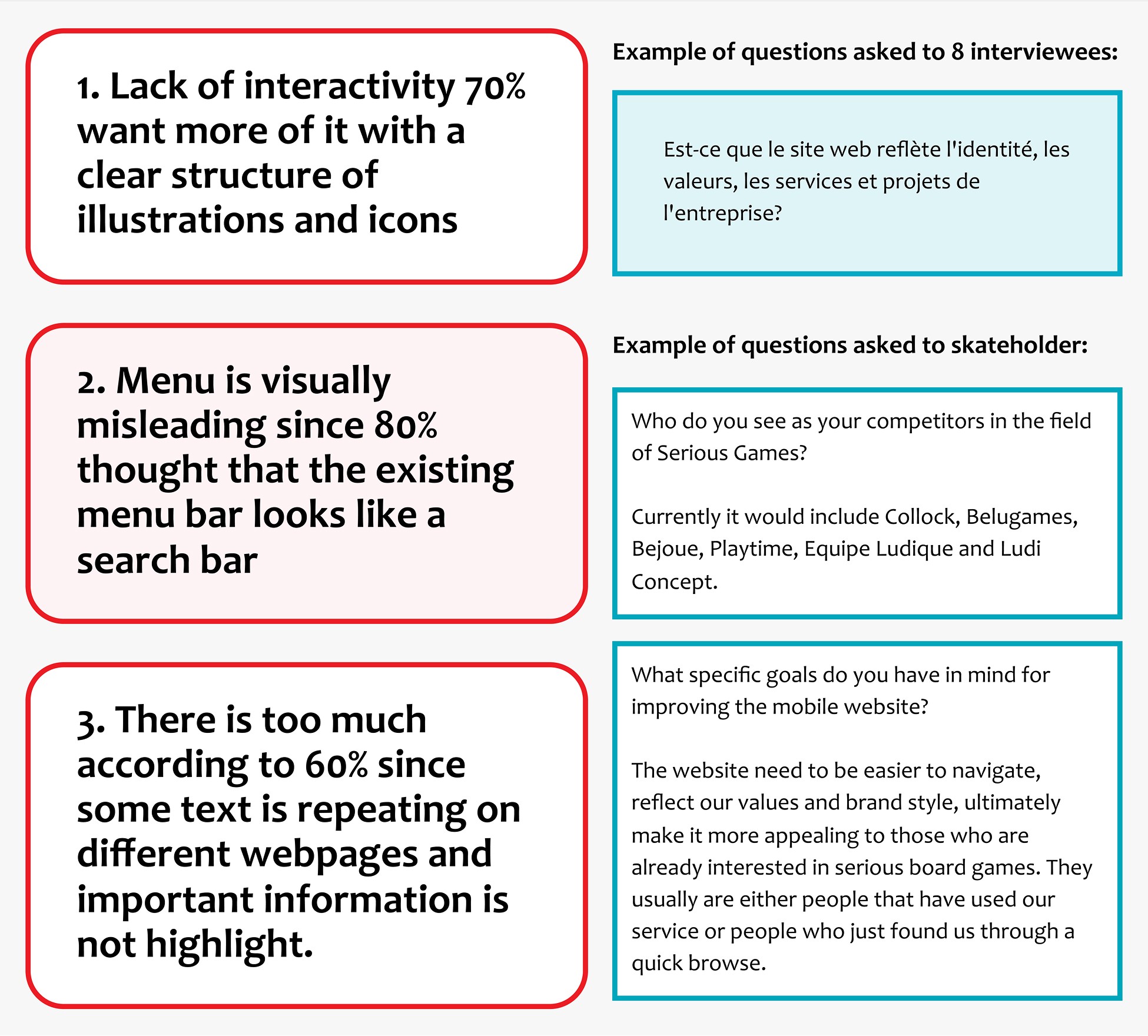
We gained rich qualitative data by interviewing eight users of the existing Prismatik website, as well as French-speaking participants. The first interview with Aurélien Lefrancois, the founder of Prismatik, helped us narrow the findings to three key pain points:
1. limited interactivity and unclear visual structure,
2. a misleading menu design, and
3. repetitive content that buried important information.
1.2 | Primary research
3 pain points that should be considered
We gained rich qualitative data by interviewing eight users of the existing Prismatik website, as well as French-speaking participants. The first interview with Aurélien Lefrancois, the founder of Prismatik, helped us narrow the findings to three key pain points:
1. limited interactivity and unclear visual structure,
2. a misleading menu design, and
3. repetitive content that buried important information.
1.2 | Primary research
3 pain points that should be considered
We gained rich qualitative data by interviewing eight users of the existing Prismatik website, as well as French-speaking participants. The first interview with Aurélien Lefrancois, the founder of Prismatik, helped us narrow the findings to three key pain points:
1. limited interactivity and unclear visual structure,
2. a misleading menu design, and
3. repetitive content that buried important information.
1.2 | Primary research
3 pain points that should be considered
We gained rich qualitative data by interviewing eight users of the existing Prismatik website, as well as French-speaking participants. The first interview with Aurélien Lefrancois, the founder of Prismatik, helped us narrow the findings to three key pain points:
1. limited interactivity and unclear visual structure,
2. a misleading menu design, and
3. repetitive content that buried important information.
2.0 | Define
Defining user goals and uncovering weak points
The user persona and journey map revealed three key insights:
1
Users valued clear, purposeful visuals and wanted straightforward navigation when exploring learning tools.
2
François’s journey showed that unclear, disorganised content discouraged revisits and reduced trust.
3
Opportunities lay in guiding first-time visitors through tailored information and interactive experiences.
SNAG
Creating the journey map was challenging due to limited research depth and low team enthusiasm, making it difficult to identify strong, evidence-based pain points.
2.0 | Define
Defining user goals and uncovering weak points
The user persona and journey map revealed three key insights:
1
Users valued clear, purposeful visuals and wanted straightforward navigation when exploring learning tools.
2
François’s journey showed that unclear, disorganised content discouraged revisits and reduced trust.
3
Opportunities lay in guiding first-time visitors through tailored information and interactive experiences.
SNAG
Creating the journey map was challenging due to limited research depth and low team enthusiasm, making it difficult to identify strong, evidence-based pain points.
2.0 | Define
Defining user goals and uncovering weak points
The user persona and journey map revealed three key insights:
1
Users valued clear, purposeful visuals and wanted straightforward navigation when exploring learning tools.
2
François’s journey showed that unclear, disorganised content discouraged revisits and reduced trust.
3
Opportunities lay in guiding first-time visitors through tailored information and interactive experiences.
SNAG
Creating the journey map was challenging due to limited research depth and low team enthusiasm, making it difficult to identify strong, evidence-based pain points.
2.0 | Define
Defining user goals and uncovering weak points
The user persona and journey map revealed three key insights:
1
Users valued clear, purposeful visuals and wanted straightforward navigation when exploring learning tools.
2
François’s journey showed that unclear, disorganised content discouraged revisits and reduced trust.
3
Opportunities lay in guiding first-time visitors through tailored information and interactive experiences.
SNAG
Creating the journey map was challenging due to limited research depth and low team enthusiasm, making it difficult to identify strong, evidence-based pain points.
2.0 | Define
Defining user goals and uncovering weak points
The user persona and journey map revealed three key insights:
1
Users valued clear, purposeful visuals and wanted straightforward navigation when exploring learning tools.
2
François’s journey showed that unclear, disorganised content discouraged revisits and reduced trust.
3
Opportunities lay in guiding first-time visitors through tailored information and interactive experiences.
SNAG
Creating the journey map was challenging due to limited research depth and low team enthusiasm, making it difficult to identify strong, evidence-based pain points.
2.0 | Define
Defining user goals and uncovering weak points
The user persona and journey map revealed three key insights:
1
Users valued clear, purposeful visuals and wanted straightforward navigation when exploring learning tools.
2
François’s journey showed that unclear, disorganised content discouraged revisits and reduced trust.
3
Opportunities lay in guiding first-time visitors through tailored information and interactive experiences.
SNAG
Creating the journey map was challenging due to limited research depth and low team enthusiasm, making it difficult to identify strong, evidence-based pain points.
2.1 | User persona
Website user overview
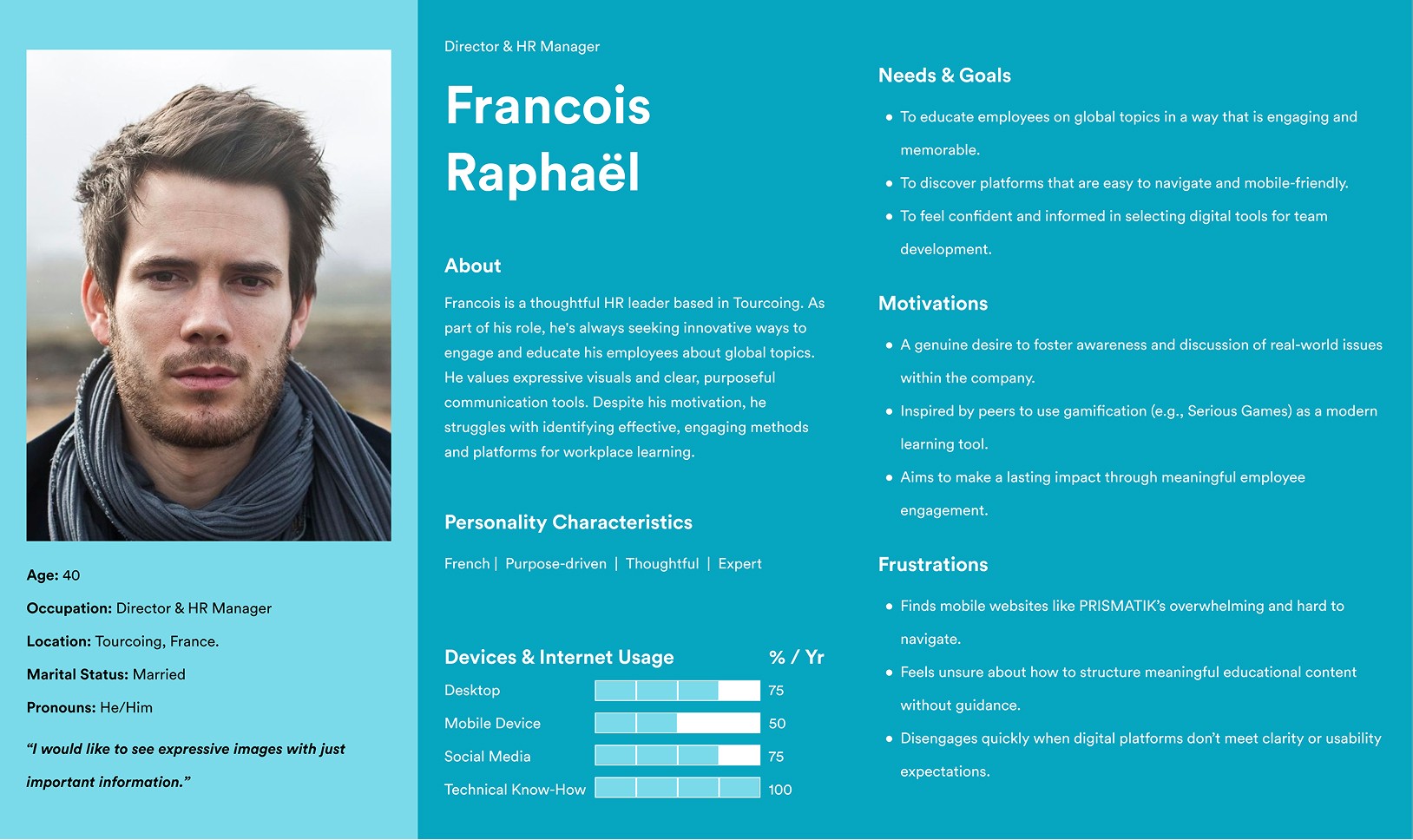
Francois is a thoughtful HR Director seeking engaging, socially conscious tools to educate his team. He values clarity, simplicity, and expressive design but is easily discouraged by poor mobile experiences.
2.1 | User persona
Website user overview
Francois is a thoughtful HR Director seeking engaging, socially conscious tools to educate his team. He values clarity, simplicity, and expressive design but is easily discouraged by poor mobile experiences.
2.1 | User persona
Website user overview
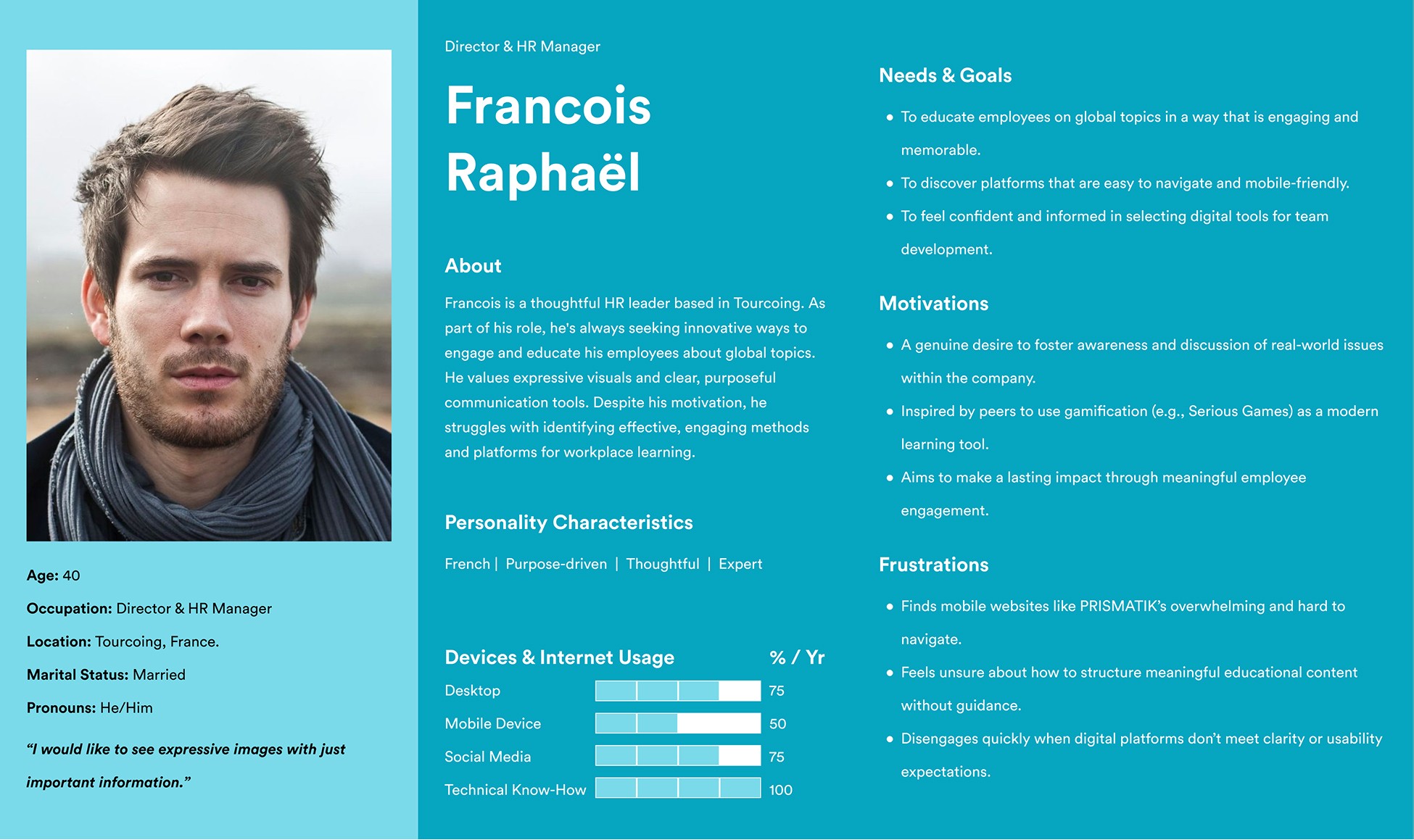
Francois is a thoughtful HR Director seeking engaging, socially conscious tools to educate his team. He values clarity, simplicity, and expressive design but is easily discouraged by poor mobile experiences.
2.1 | User persona
Website user overview
Francois is a thoughtful HR Director seeking engaging, socially conscious tools to educate his team. He values clarity, simplicity, and expressive design but is easily discouraged by poor mobile experiences.
2.1 | User persona
Website user overview
Francois is a thoughtful HR Director seeking engaging, socially conscious tools to educate his team. He values clarity, simplicity, and expressive design but is easily discouraged by poor mobile experiences.
2.1 | User persona
Website user overview
Francois is a thoughtful HR Director seeking engaging, socially conscious tools to educate his team. He values clarity, simplicity, and expressive design but is easily discouraged by poor mobile experiences.
2.2 | User journey map
Usage opportunities
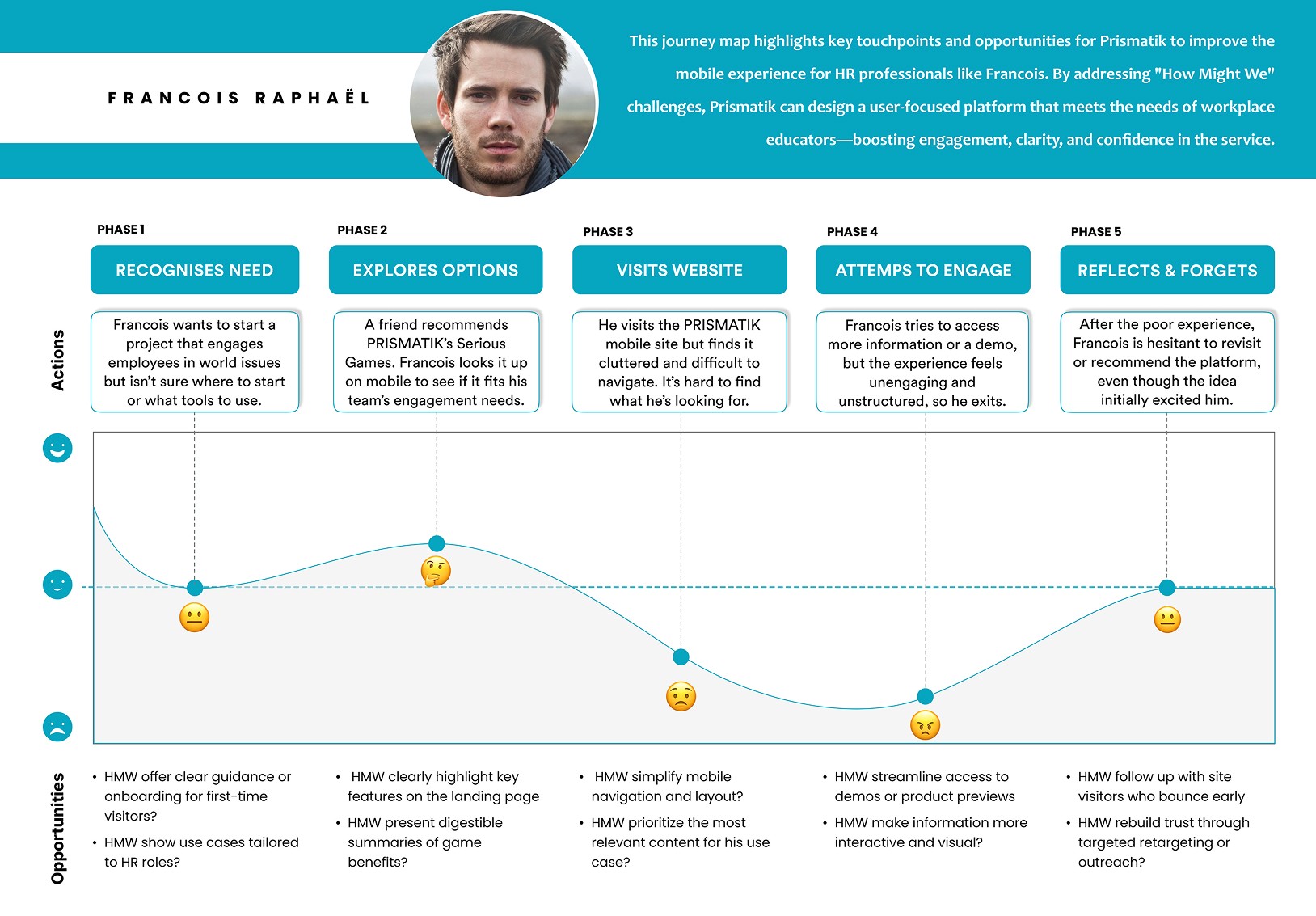
This journey map highlights key touchpoints and opportunities for Prismatik to improve the mobile experience for HR professionals like Francois. By addressing "How Might We" challenges, Prismatik can design a user-focused platform that meets the needs of workplace educators — boosting engagement, clarity, and confidence in the service.
2.2 | User journey map
Usage opportunities
This journey map highlights key touchpoints and opportunities for Prismatik to improve the mobile experience for HR professionals like Francois. By addressing "How Might We" challenges, Prismatik can design a user-focused platform that meets the needs of workplace educators — boosting engagement, clarity, and confidence in the service.
2.2 | User journey map
Usage opportunities
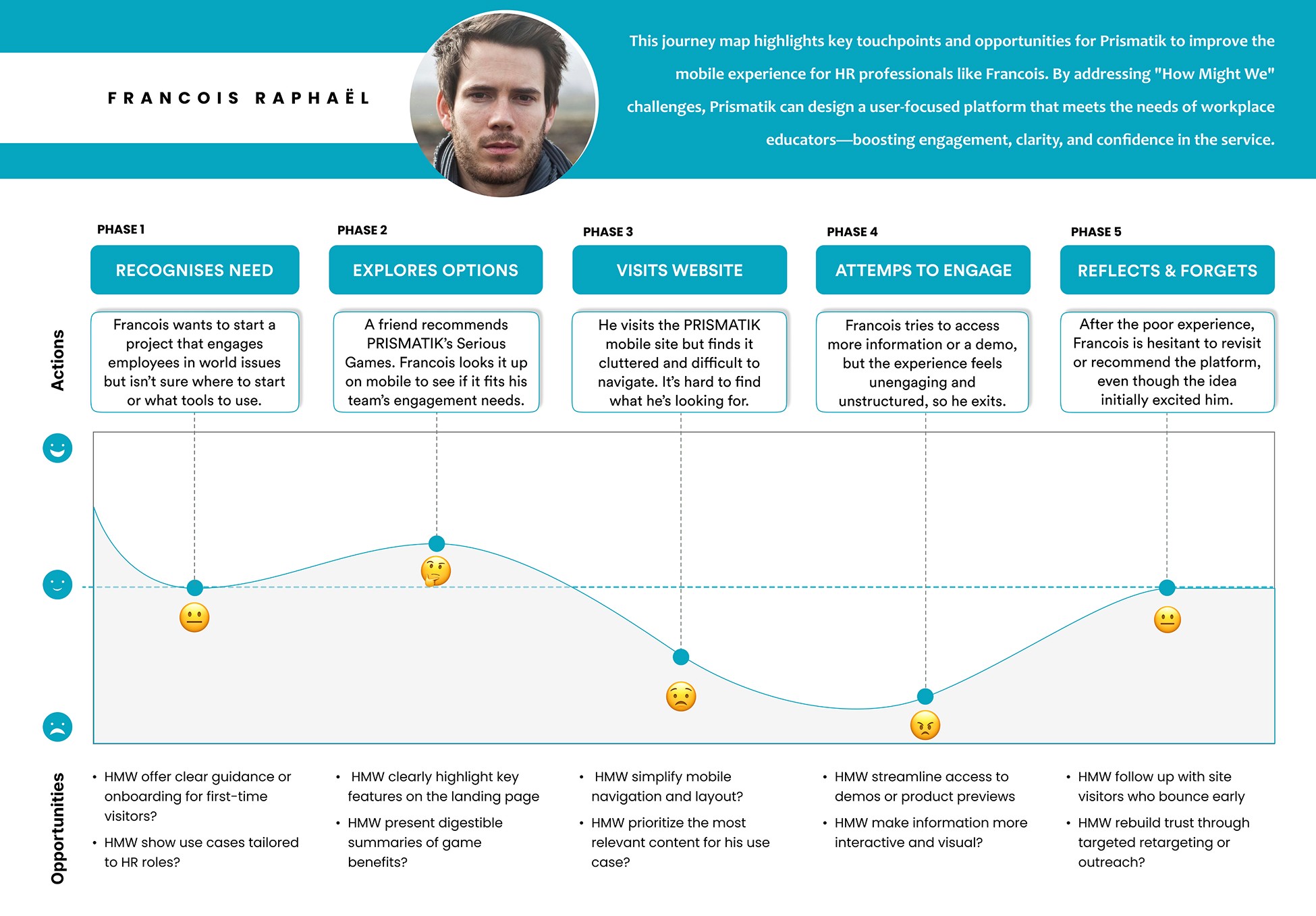
This journey map highlights key touchpoints and opportunities for Prismatik to improve the mobile experience for HR professionals like Francois. By addressing "How Might We" challenges, Prismatik can design a user-focused platform that meets the needs of workplace educators — boosting engagement, clarity, and confidence in the service.
2.2 | User journey map
Usage opportunities
This journey map highlights key touchpoints and opportunities for Prismatik to improve the mobile experience for HR professionals like Francois. By addressing "How Might We" challenges, Prismatik can design a user-focused platform that meets the needs of workplace educators — boosting engagement, clarity, and confidence in the service.
2.2 | User journey map
Usage opportunities
This journey map highlights key touchpoints and opportunities for Prismatik to improve the mobile experience for HR professionals like Francois. By addressing "How Might We" challenges, Prismatik can design a user-focused platform that meets the needs of workplace educators — boosting engagement, clarity, and confidence in the service.
2.2 | User journey map
Usage opportunities
This journey map highlights key touchpoints and opportunities for Prismatik to improve the mobile experience for HR professionals like Francois. By addressing "How Might We" challenges, Prismatik can design a user-focused platform that meets the needs of workplace educators — boosting engagement, clarity, and confidence in the service.
3.0 | Develop
Refining Navigation and Clarifying Content Structure
The user flow and mid-fi prototypes revealed three key insights:
1
Interactive icons and symbols were often misunderstood, causing confusion during navigation.
2
Users struggled to recognise grouped content and hidden information due to unclear hierarchy.
3
Visual emphasis was misplaced on secondary elements, making key actions less noticeable.

SNAG
Limited research depth, language constraints, and mid-fi fidelity made it challenging to validate interactions, reducing the strength of evidence for defining precise pain points.
3.0 | Develop
Refining Navigation and Clarifying Content Structure
The user flow and mid-fi prototypes revealed three key insights:
1
Interactive icons and symbols were often misunderstood, causing confusion during navigation.
2
Users struggled to recognise grouped content and hidden information due to unclear hierarchy.
3
Visual emphasis was misplaced on secondary elements, making key actions less noticeable.
SNAG
Limited research depth, language constraints, and mid-fi fidelity made it challenging to validate interactions, reducing the strength of evidence for defining precise pain points.
3.0 | Develop
Refining Navigation and Clarifying Content Structure
The user flow and mid-fi prototypes revealed three key insights:
1
Interactive icons and symbols were often misunderstood, causing confusion during navigation.
2
Users struggled to recognise grouped content and hidden information due to unclear hierarchy.
3
Visual emphasis was misplaced on secondary elements, making key actions less noticeable.
SNAG
Limited research depth, language constraints, and mid-fi fidelity made it challenging to validate interactions, reducing the strength of evidence for defining precise pain points.
3.0 | Develop
Refining Navigation and Clarifying Content Structure
The user flow and mid-fi prototypes revealed three key insights:
1
Interactive icons and symbols were often misunderstood, causing confusion during navigation.
2
Users struggled to recognise grouped content and hidden information due to unclear hierarchy.
3
Visual emphasis was misplaced on secondary elements, making key actions less noticeable.
SNAG
Limited research depth, language constraints, and mid-fi fidelity made it challenging to validate interactions, reducing the strength of evidence for defining precise pain points.
3.0 | Develop
Refining Navigation and Clarifying Content Structure
The user flow and mid-fi prototypes revealed three key insights:
1
Interactive icons and symbols were often misunderstood, causing confusion during navigation.
2
Users struggled to recognise grouped content and hidden information due to unclear hierarchy.
3
Visual emphasis was misplaced on secondary elements, making key actions less noticeable.
SNAG
Limited research depth, language constraints, and mid-fi fidelity made it challenging to validate interactions, reducing the strength of evidence for defining precise pain points.
3.0 | Develop
Refining Navigation and Clarifying Content Structure
The user flow and mid-fi prototypes revealed three key insights:
1
Interactive icons and symbols were often misunderstood, causing confusion during navigation.
2
Users struggled to recognise grouped content and hidden information due to unclear hierarchy.
3
Visual emphasis was misplaced on secondary elements, making key actions less noticeable.
SNAG
Limited research depth, language constraints, and mid-fi fidelity made it challenging to validate interactions, reducing the strength of evidence for defining precise pain points.
3.1 | Usability tests
Mid-fi prototype navigation responses
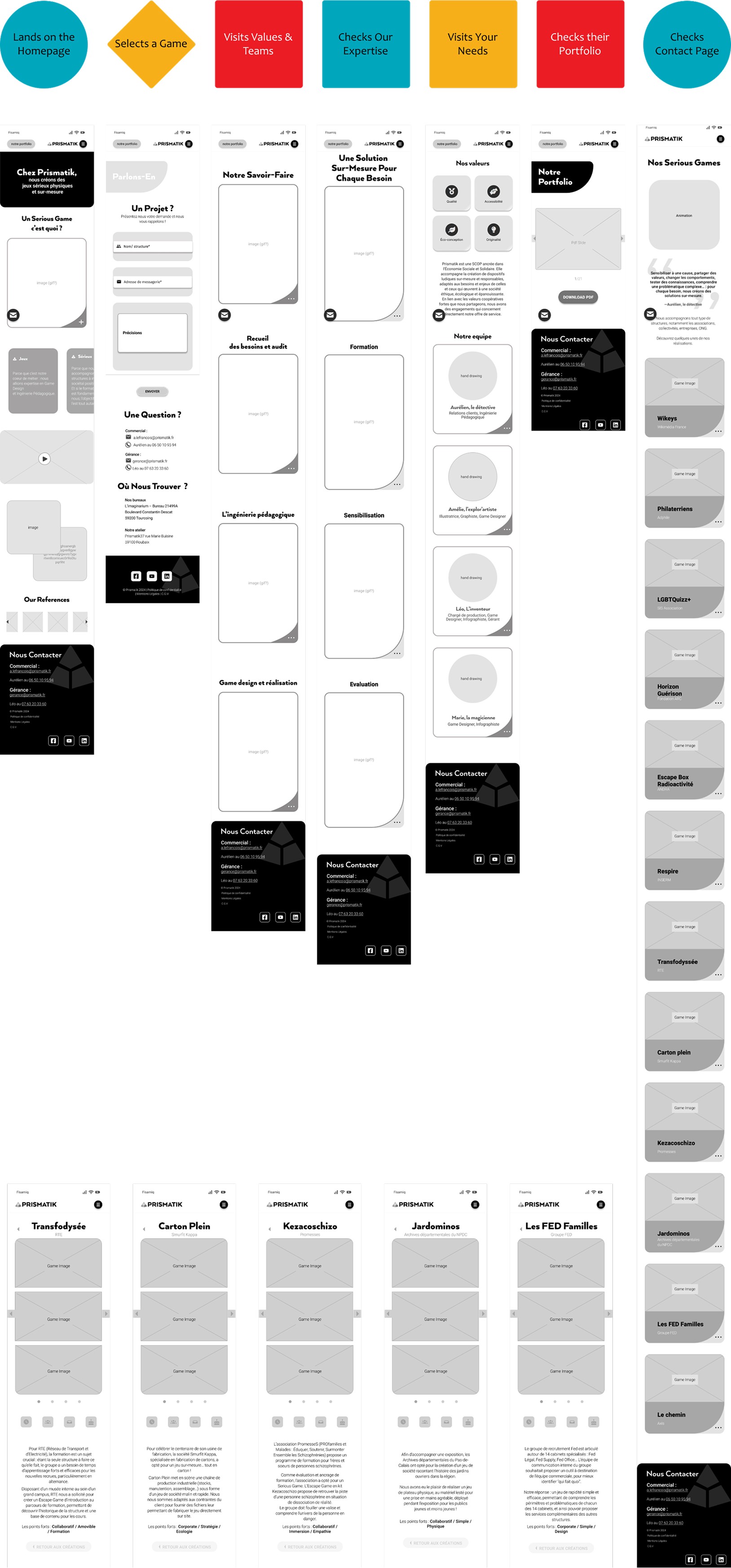
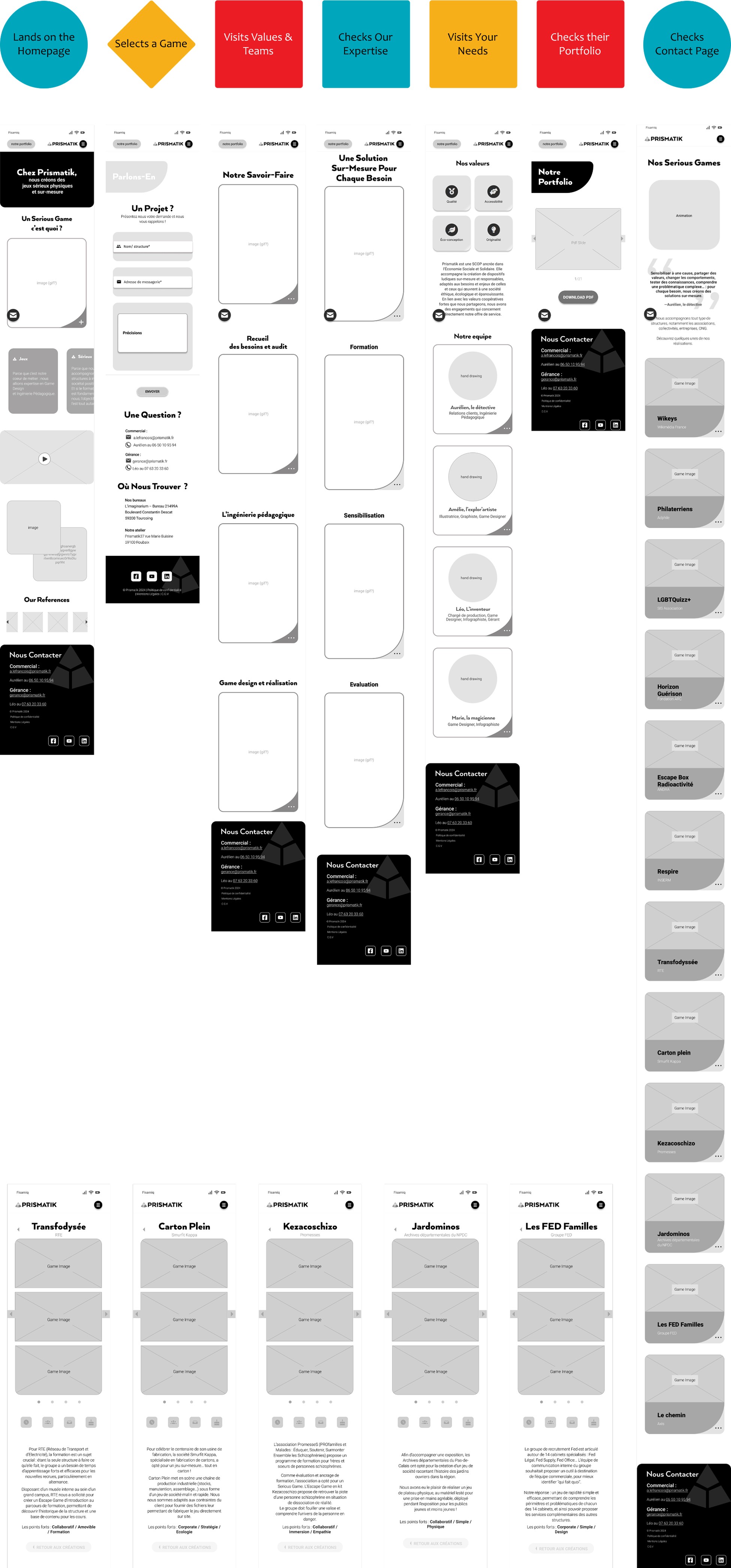
Defined a user's happy path in seven steps and conducted usability tests using a mid-fidelity prototype.
This involved eight Ironhackers who were fluent in French. Insights were gathered by observing and recording the participants' responses as they interacted with the prototype. The tests helped clarify the design pain points.
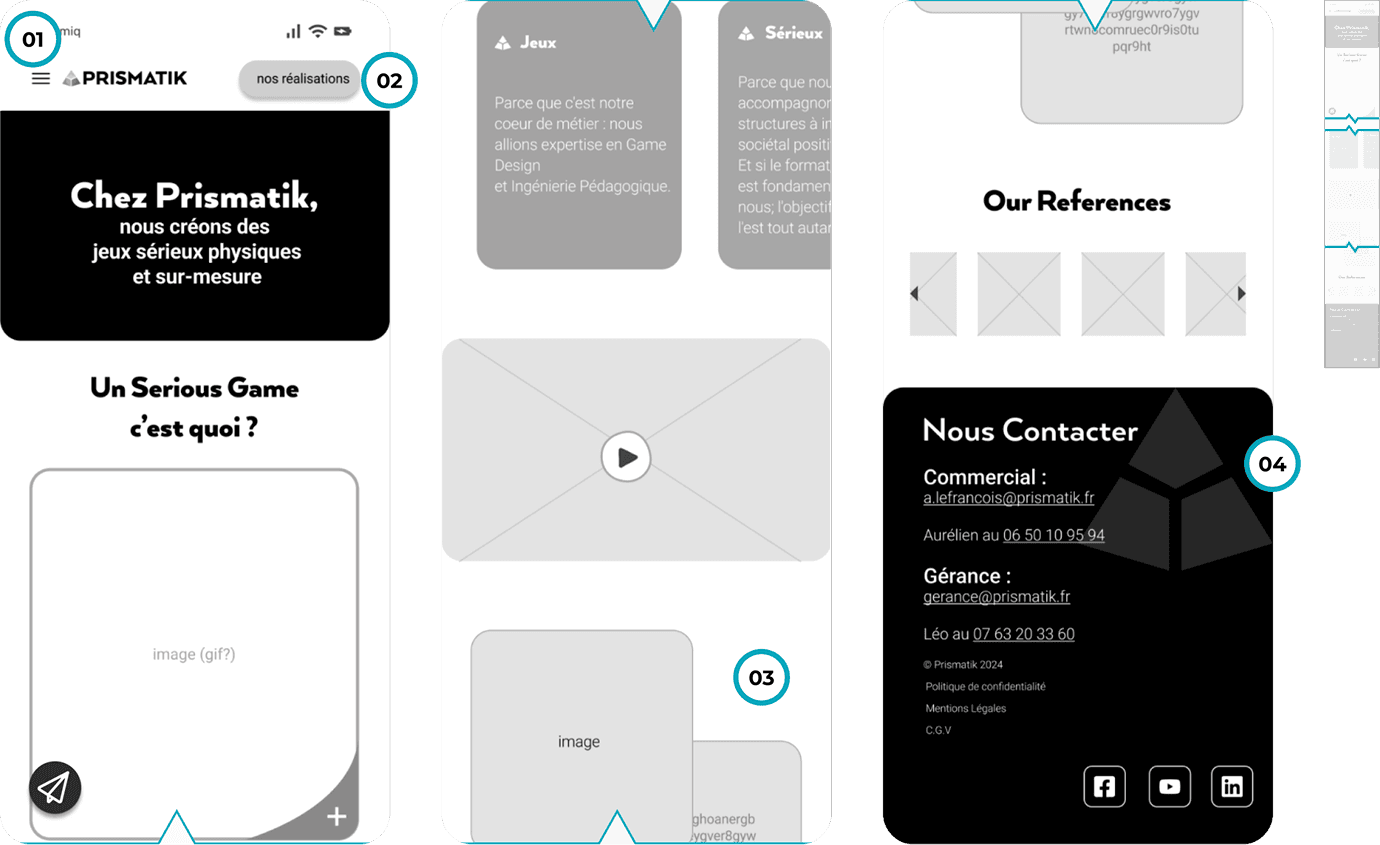
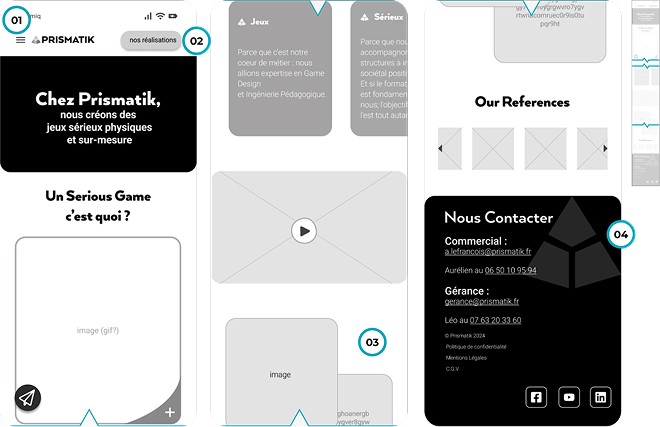
The slideshow below highlights the pain points identified in each step of the happy path.
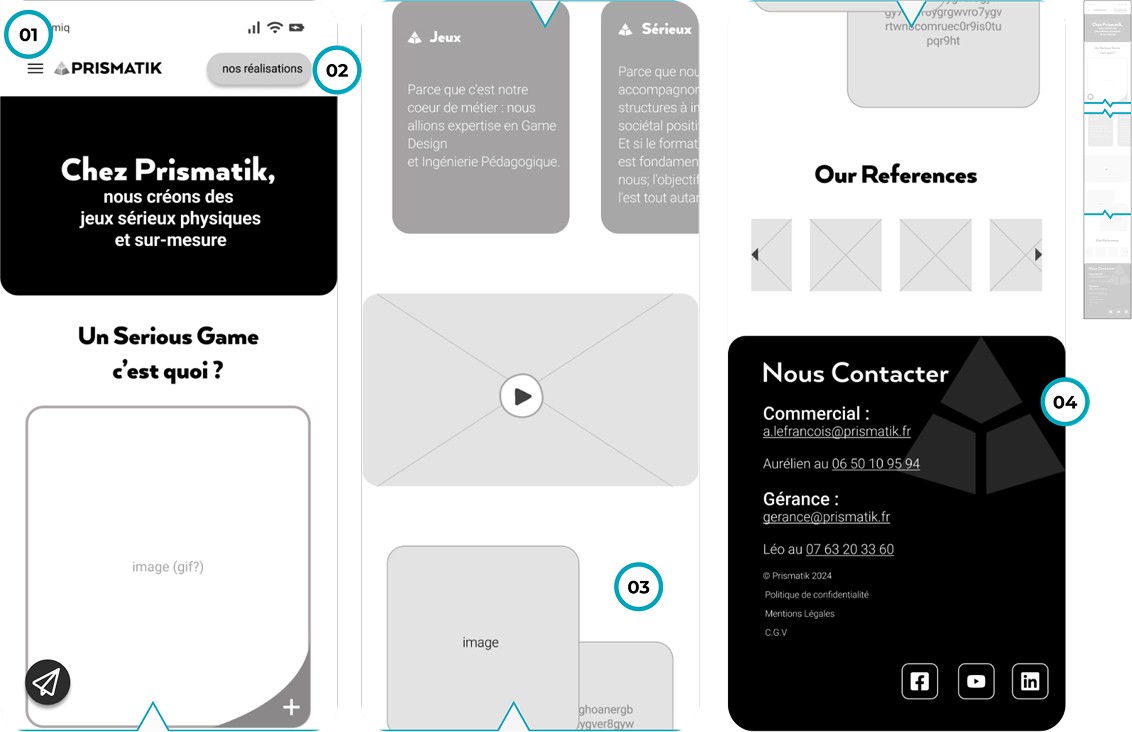
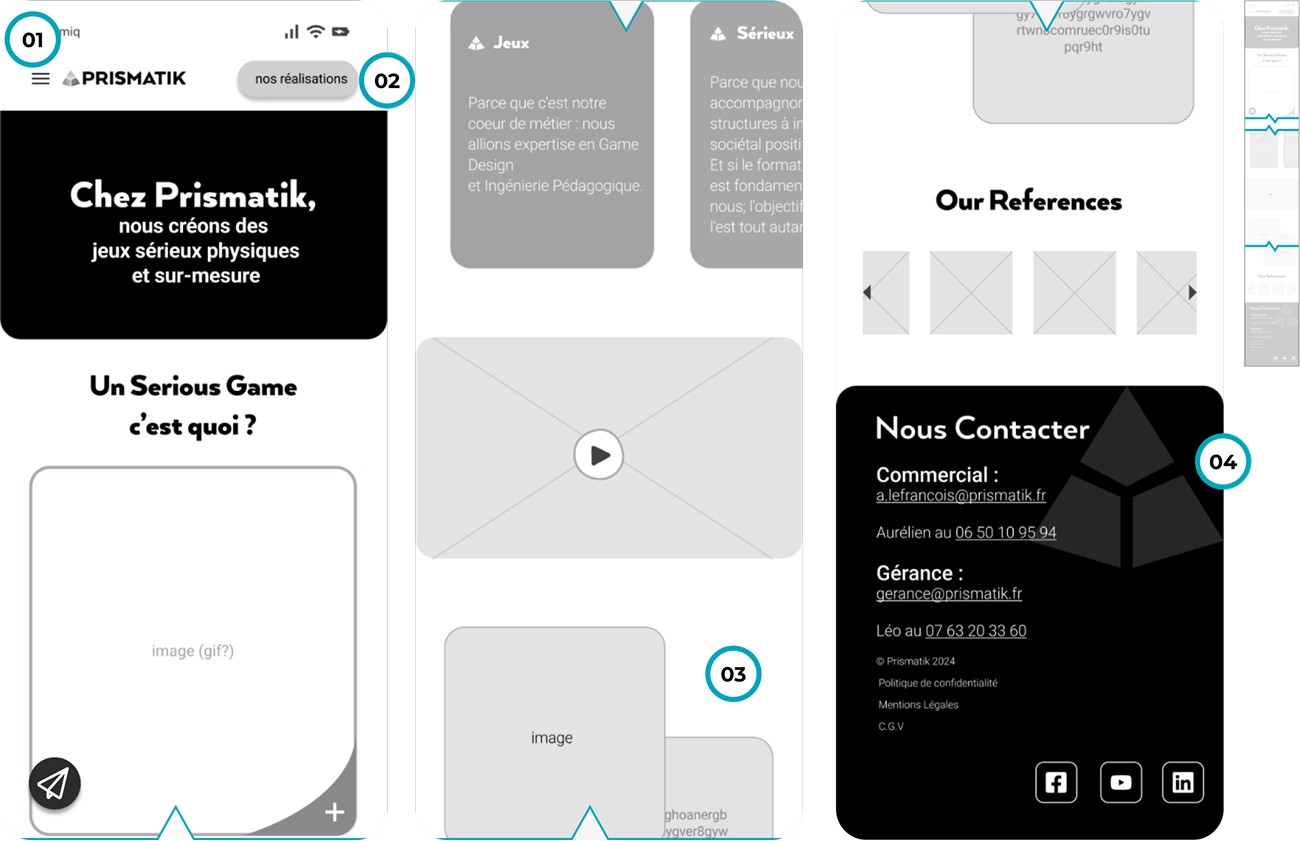
01
It is more commonly placed on right hand side of the webpage.
02
This becomes the main focus and it’s not clear that it leads to another tab.
03
The toggle is not intuitive could be replaced with a automated slide.
04
This footer is to long and the details are repeated on the contact page.
enters 'Lading' page
3.1 | Usability tests
Mid-fi prototype navigation responses
Defined a user's happy path in seven steps and conducted usability tests using a mid-fidelity prototype.
This involved eight Ironhackers who were fluent in French. Insights were gathered by observing and recording the participants' responses as they interacted with the prototype. The tests helped clarify the design pain points.
The slideshow below highlights the pain points identified in each step of the happy path.
enters 'Lading' page
3.1 | Usability tests
Mid-fi prototype navigation responses
Defined a user's happy path in seven steps and conducted usability tests using a mid-fidelity prototype.
This involved eight Ironhackers who were fluent in French. Insights were gathered by observing and recording the participants' responses as they interacted with the prototype. The tests helped clarify the design pain points.
The slideshow below highlights the pain points identified in each step of the happy path.
enters 'Lading' page
3.1 | Usability tests
Mid-fi prototype navigation responses
Defined a user's happy path in seven steps and conducted usability tests using a mid-fidelity prototype.
This involved eight Ironhackers who were fluent in French. Insights were gathered by observing and recording the participants' responses as they interacted with the prototype. The tests helped clarify the design pain points.
The slideshow below highlights the pain points identified in each step of the happy path.
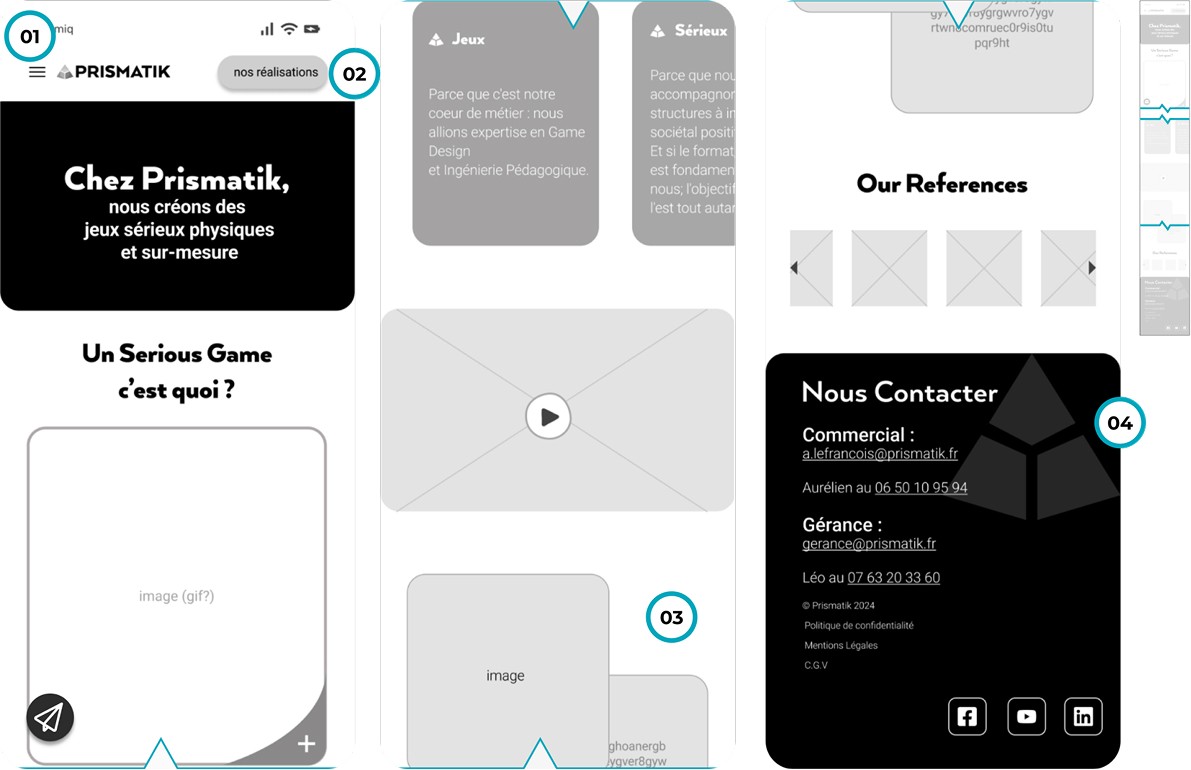
01
It is more commonly placed on right hand side of the webpage.
02
This becomes the main focus and it’s not clear that it leads to another tab.
03
The toggle is not intuitive could be replaced with a automated slide.
04
This footer is to long and the details are repeated on the contact page.
enters 'Lading' page
3.1 | Usability tests
Mid-fi prototype navigation responses
Defined a user's happy path in seven steps and conducted usability tests using a mid-fidelity prototype.
This involved eight Ironhackers who were fluent in French. Insights were gathered by observing and recording the participants' responses as they interacted with the prototype. The tests helped clarify the design pain points.
The slideshow below highlights the pain points identified in each step of the happy path.
enters 'Lading' page
3.1 | Usability tests
Mid-fi prototype navigation responses
Defined a user's happy path in seven steps and conducted usability tests using a mid-fidelity prototype.
This involved eight Ironhackers who were fluent in French. Insights were gathered by observing and recording the participants' responses as they interacted with the prototype. The tests helped clarify the design pain points.
The slideshow below highlights the pain points identified in each step of the happy path.
enters 'Lading' page
3.2 | A/B testing
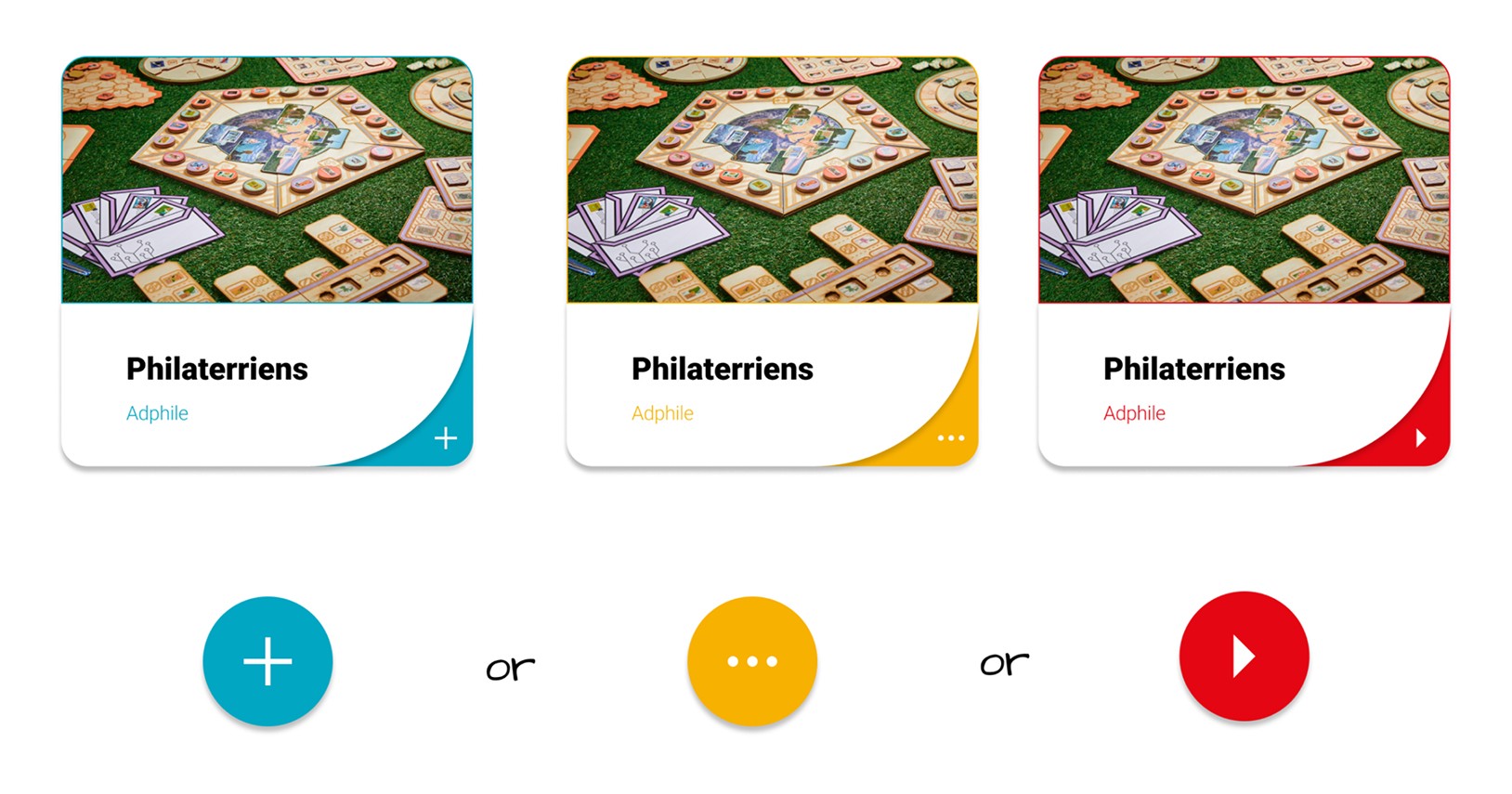
Evaluating Icon Options
We tested three action icons through quick A/B studies and Useberry interactions to see which felt most intuitive. With no clear preference and limited testing time, we relied on design judgment to select the option that best supported the user flow.
3.2 | A/B testing
Evaluating Icon Options
We tested three action icons through quick A/B studies and Useberry interactions to see which felt most intuitive. With no clear preference and limited testing time, we relied on design judgment to select the option that best supported the user flow.
3.2 | A/B testing
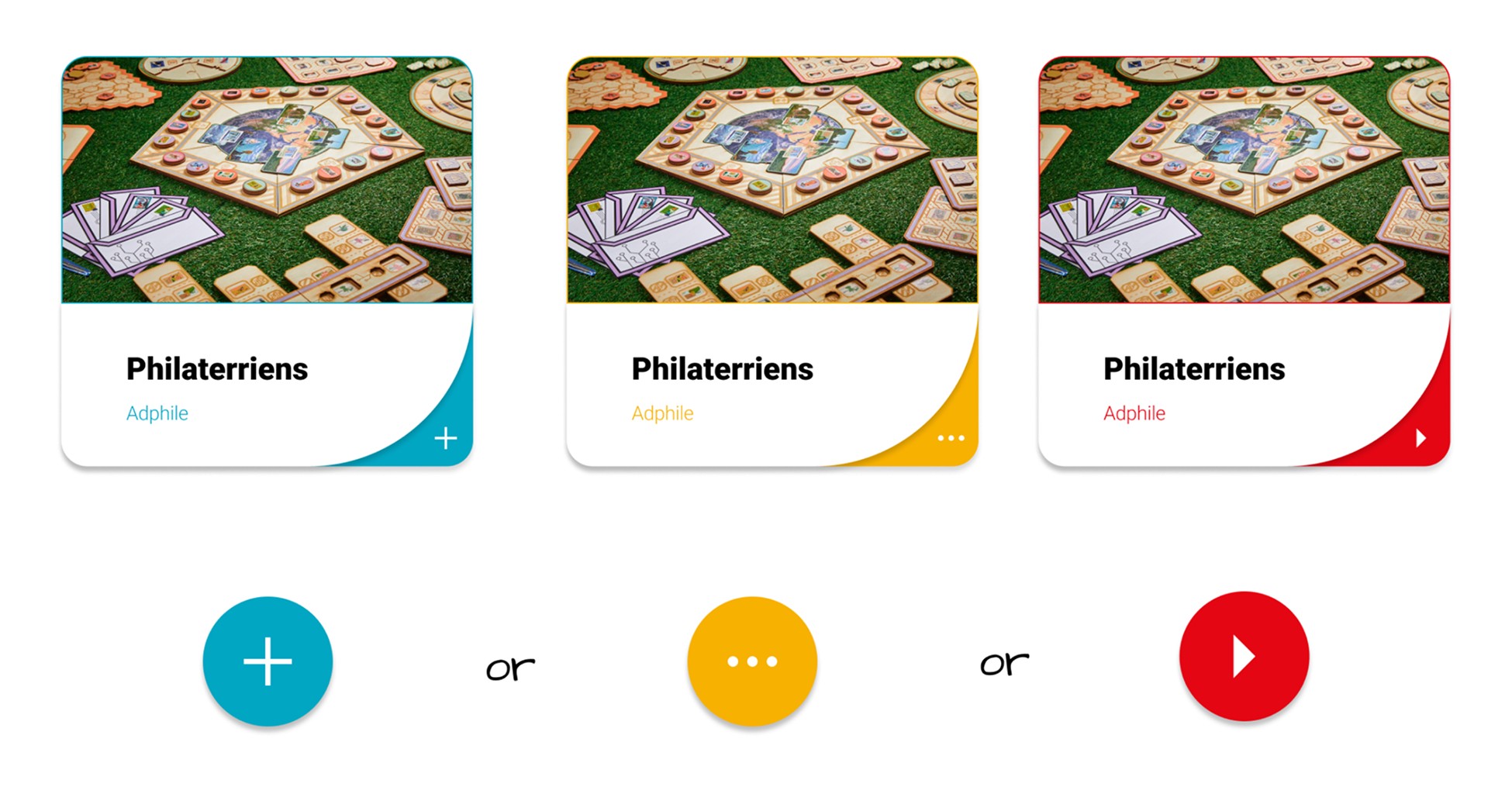
Evaluating Icon Options
We tested three action icons through quick A/B studies and Useberry interactions to see which felt most intuitive. With no clear preference and limited testing time, we relied on design judgment to select the option that best supported the user flow.
3.2 | A/B testing
Evaluating Icon Options
We tested three action icons through quick A/B studies and Useberry interactions to see which felt most intuitive. With no clear preference and limited testing time, we relied on design judgment to select the option that best supported the user flow.
3.2 | A/B testing
Evaluating Icon Options
We tested three action icons through quick A/B studies and Useberry interactions to see which felt most intuitive. With no clear preference and limited testing time, we relied on design judgment to select the option that best supported the user flow.
3.2 | A/B testing
Evaluating Icon Options
We tested three action icons through quick A/B studies and Useberry interactions to see which felt most intuitive. With no clear preference and limited testing time, we relied on design judgment to select the option that best supported the user flow.
4.0 | Deliver
Refining structure, interaction, and responsiveness
The prototypes and responsive layouts revealed three key insights:
1
Test users struggled to distinguish interactive elements because icons, buttons, and colours didn’t clearly convey their purpose.
2
Content hierarchy weakened across devices, with key actions becoming less noticeable from mobile to desktop.
3
Visual consistency was hard to maintain, as colour-blindness tests revealed contrast issues.
SNAG
Working within fixed brand colours and limited WordPress implementation capabilities reduced the ability to apply the full design system as intended.
4.0 | Deliver
Refining structure, interaction, and responsiveness
The prototypes and responsive layouts revealed three key insights:
1
Test users struggled to distinguish interactive elements because icons, buttons, and colours didn’t clearly convey their purpose.
2
Content hierarchy weakened across devices, with key actions becoming less noticeable from mobile to desktop.
3
Visual consistency was hard to maintain, as colour-blindness tests revealed contrast issues.
SNAG
Working within fixed brand colours and limited WordPress implementation capabilities reduced the ability to apply the full design system as intended.
4.0 | Deliver
Refining structure, interaction, and responsiveness
The prototypes and responsive layouts revealed three key insights:
1
Test users struggled to distinguish interactive elements because icons, buttons, and colours didn’t clearly convey their purpose.
2
Content hierarchy weakened across devices, with key actions becoming less noticeable from mobile to desktop.
3
Visual consistency was hard to maintain, as colour-blindness tests revealed contrast issues.
SNAG
Working within fixed brand colours and limited WordPress implementation capabilities reduced the ability to apply the full design system as intended.
4.0 | Deliver
Refining structure, interaction, and responsiveness
The prototypes and responsive layouts revealed three key insights:
1
Test users struggled to distinguish interactive elements because icons, buttons, and colours didn’t clearly convey their purpose.
2
Content hierarchy weakened across devices, with key actions becoming less noticeable from mobile to desktop.
3
Visual consistency was hard to maintain, as colour-blindness tests revealed contrast issues.
SNAG
Working within fixed brand colours and limited WordPress implementation capabilities reduced the ability to apply the full design system as intended.
4.0 | Deliver
Refining structure, interaction, and responsiveness
The prototypes and responsive layouts revealed three key insights:
1
Test users struggled to distinguish interactive elements because icons, buttons, and colours didn’t clearly convey their purpose.
2
Content hierarchy weakened across devices, with key actions becoming less noticeable from mobile to desktop.
3
Visual consistency was hard to maintain, as colour-blindness tests revealed contrast issues.
SNAG
Working within fixed brand colours and limited WordPress implementation capabilities reduced the ability to apply the full design system as intended.
4.0 | Deliver
Refining structure, interaction, and responsiveness
The prototypes and responsive layouts revealed three key insights:
1
Test users struggled to distinguish interactive elements because icons, buttons, and colours didn’t clearly convey their purpose.
2
Content hierarchy weakened across devices, with key actions becoming less noticeable from mobile to desktop.
3
Visual consistency was hard to maintain, as colour-blindness tests revealed contrast issues.
SNAG
Working within fixed brand colours and limited WordPress implementation capabilities reduced the ability to apply the full design system as intended.
4.1 | Design system
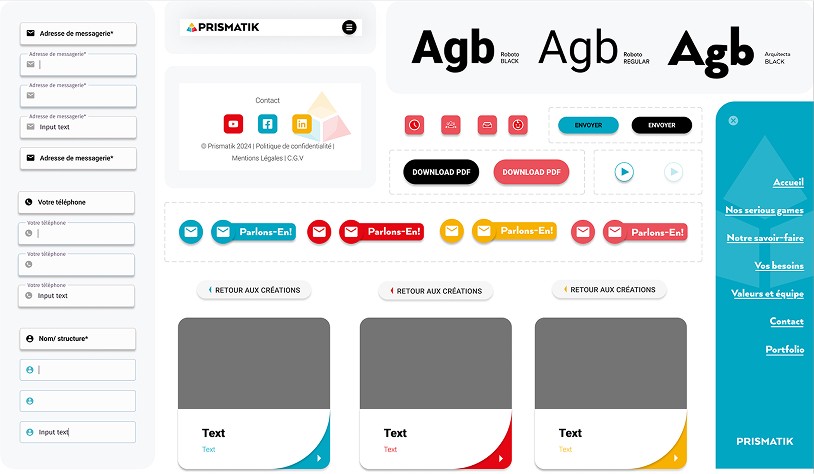
Typography, icons & more
We respected the client's desire to maintain their existing graphic style, in other words, having the existing set of colours and typography. Our main focus was on ensuring their graphic set is well presented through our bespoke user interface components.
4.1 | Design system
Typography, icons & more
We respected the client's desire to maintain their existing graphic style, in other words, having the existing set of colours and typography. Our main focus was on ensuring their graphic set is well presented through our bespoke user interface components.
4.1 | Design system
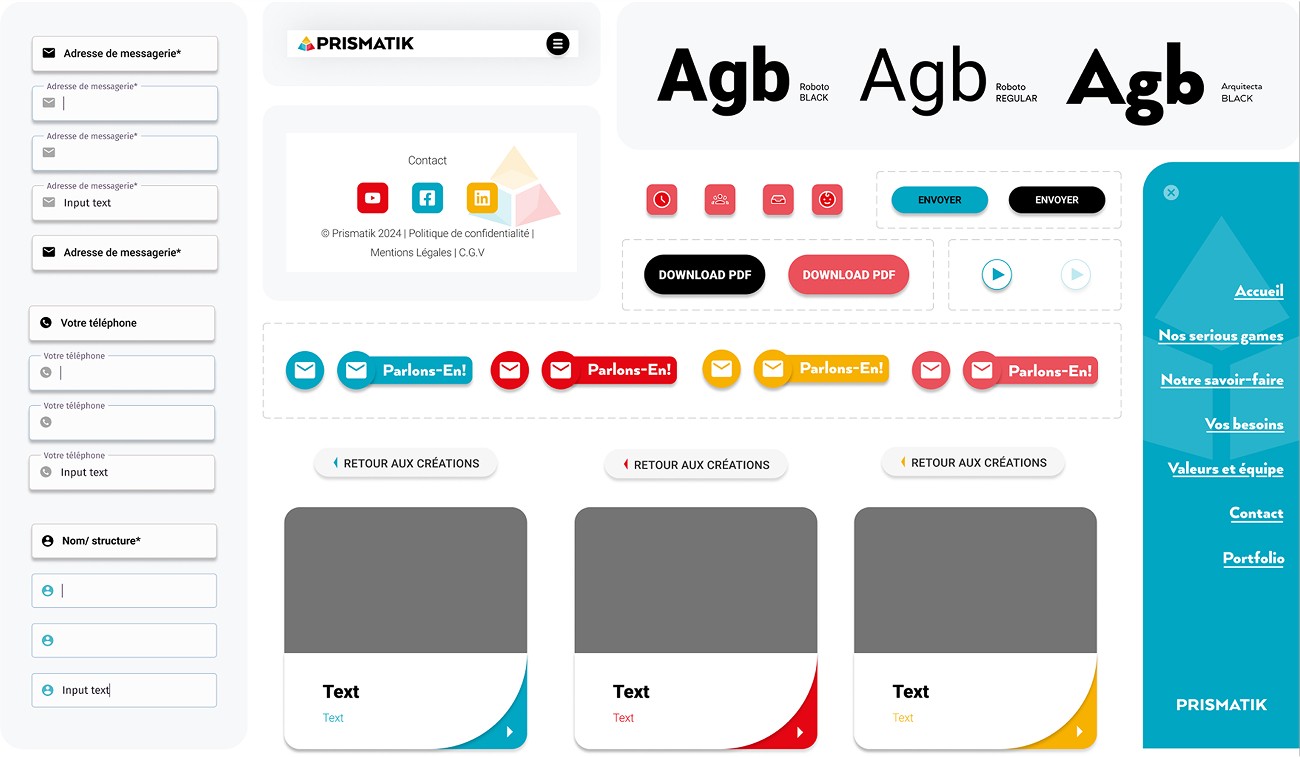
Typography, icons & more
We respected the client's desire to maintain their existing graphic style, in other words, having the existing set of colours and typography. Our main focus was on ensuring their graphic set is well presented through our bespoke user interface components.
4.1 | Design system
Typography, icons & more
We respected the client's desire to maintain their existing graphic style, in other words, having the existing set of colours and typography. Our main focus was on ensuring their graphic set is well presented through our bespoke user interface components.
4.1 | Design system
Typography, icons & more
We respected the client's desire to maintain their existing graphic style, in other words, having the existing set of colours and typography. Our main focus was on ensuring their graphic set is well presented through our bespoke user interface components.
4.1 | Design system
Typography, icons & more
We respected the client's desire to maintain their existing graphic style, in other words, having the existing set of colours and typography. Our main focus was on ensuring their graphic set is well presented through our bespoke user interface components.
4.2 | Accessibility
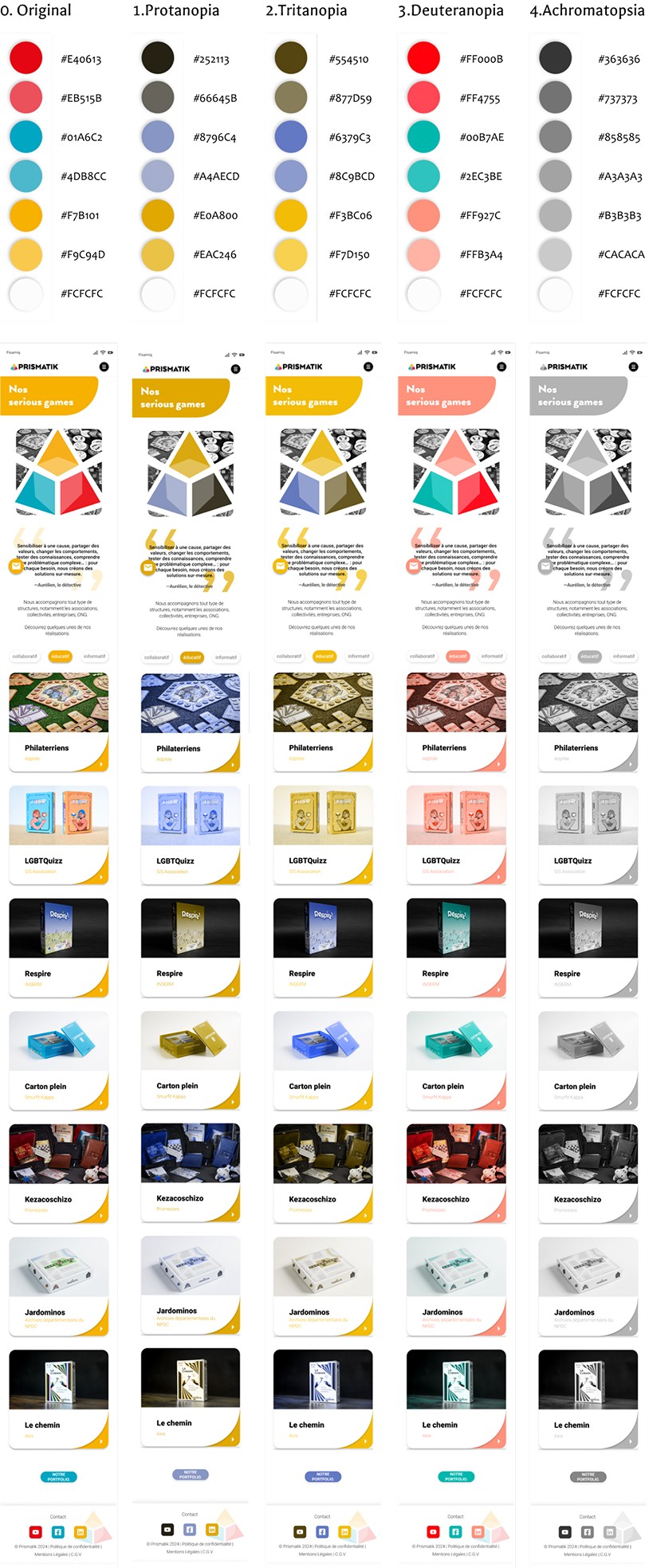
WCAG and Colour Blindness tests
Our accessibility evaluation included colour blind tests, which were carried out because of Prismatik's values on inclusivity and diversity, but also in the hope of enhancing user experience. We learned it is best to replace pixels with vector photos.
4.2 | Accessibility
WCAG and Colour Blindness tests
Our accessibility evaluation included colour blind tests, which were carried out because of Prismatik's values on inclusivity and diversity, but also in the hope of enhancing user experience. We learned it is best to replace pixels with vector photos.
4.2 | Accessibility
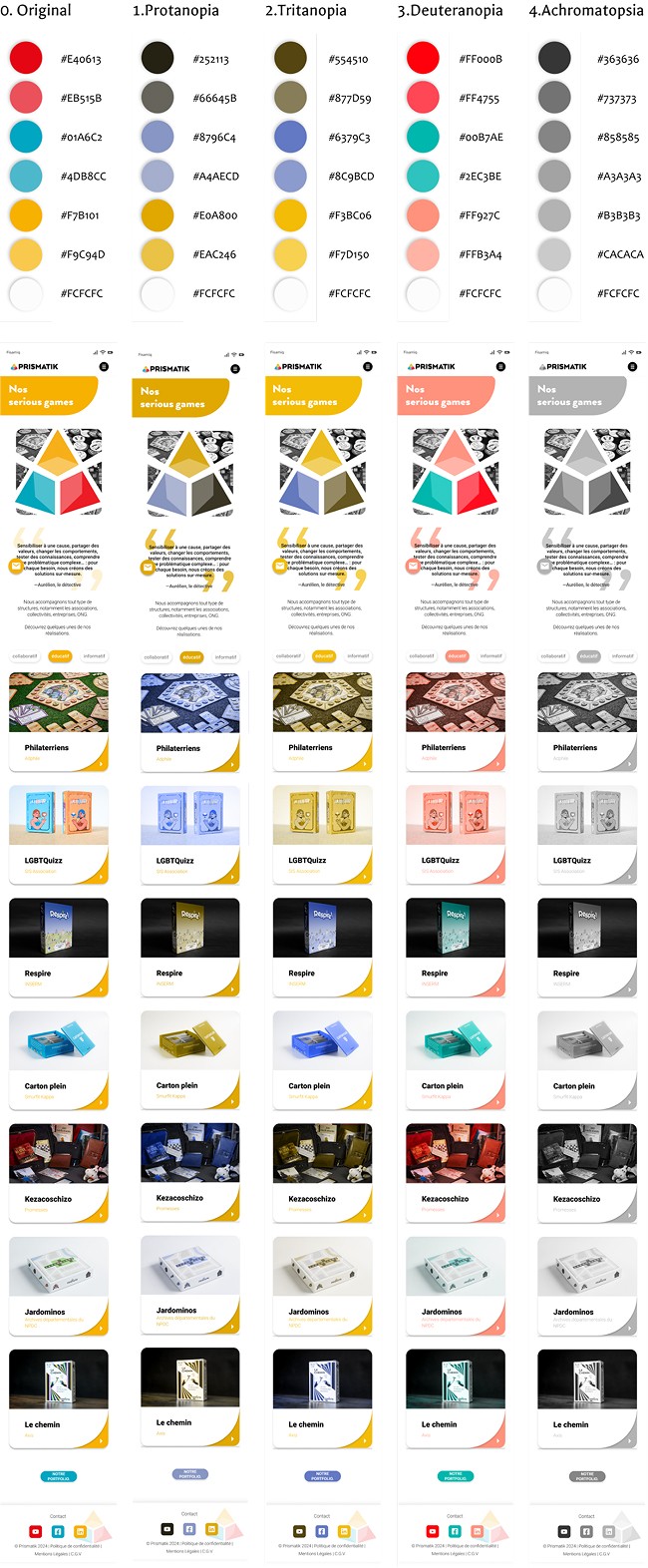
WCAG and Colour Blindness tests
Our accessibility evaluation included colour blind tests, which were carried out because of Prismatik's values on inclusivity and diversity, but also in the hope of enhancing user experience. We learned it is best to replace pixels with vector photos.
4.2 | Accessibility
WCAG and Colour Blindness tests
Our accessibility evaluation included colour blind tests, which were carried out because of Prismatik's values on inclusivity and diversity, but also in the hope of enhancing user experience. We learned it is best to replace pixels with vector photos.
4.2 | Accessibility
WCAG and Colour Blindness tests
Our accessibility evaluation included colour blind tests, which were carried out because of Prismatik's values on inclusivity and diversity, but also in the hope of enhancing user experience. We learned it is best to replace pixels with vector photos.
4.2 | Accessibility
WCAG and Colour Blindness tests
Our accessibility evaluation included colour blind tests, which were carried out because of Prismatik's values on inclusivity and diversity, but also in the hope of enhancing user experience. We learned it is best to replace pixels with vector photos.
4.3 | Responsiveness
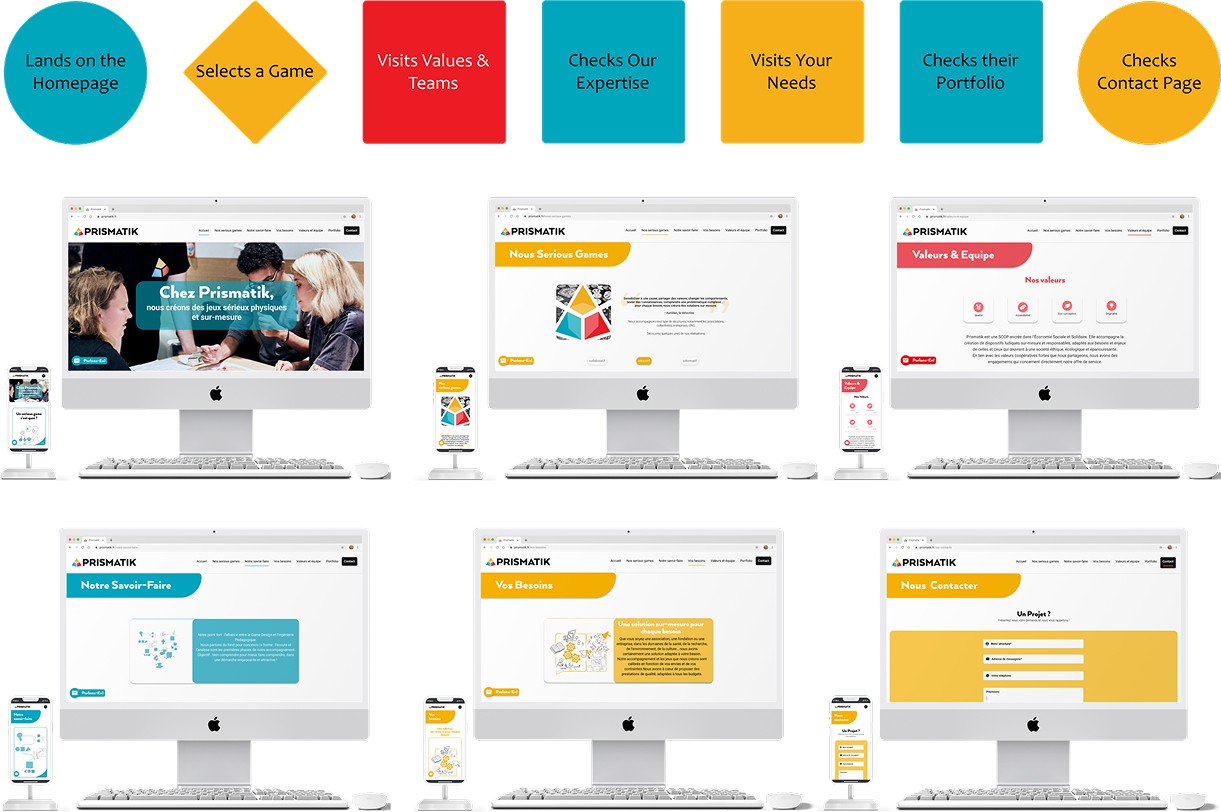
Screen fitting to multiple devices
To make sure the design morphs from mobile to desktop, we adhered to responsiveness guidelines and standards. Hence, designed desktop screens too.
4.3 | Responsiveness
Screen fitting to multiple devices
To make sure the design morphs from mobile to desktop, we adhered to responsiveness guidelines and standards. Hence, designed desktop screens too.
4.3 | Responsiveness
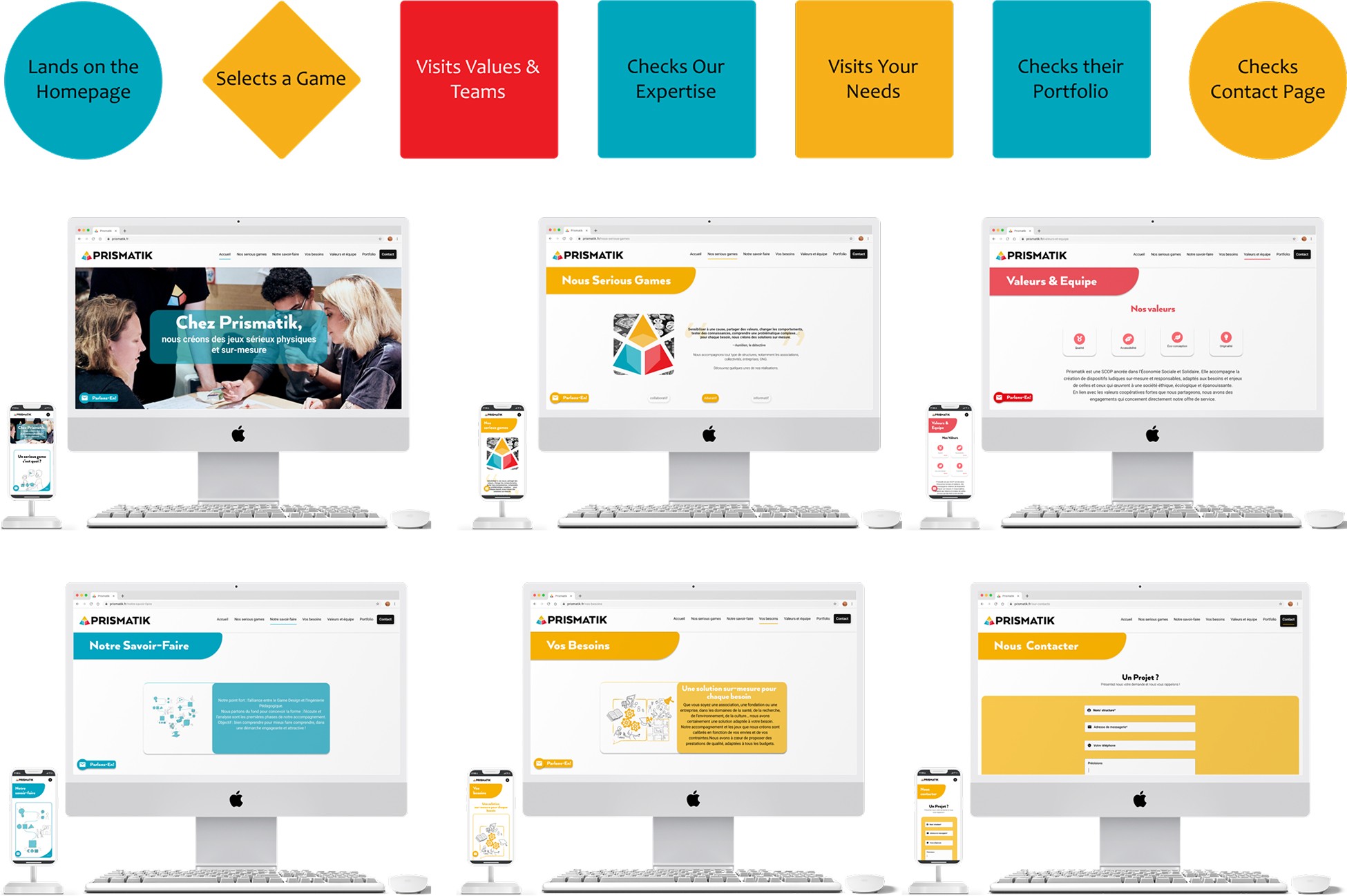
Screen fitting to multiple devices
To make sure the design morphs from mobile to desktop, we adhered to responsiveness guidelines and standards. Hence, designed desktop screens too.
4.3 | Responsiveness
Screen fitting to multiple devices
To make sure the design morphs from mobile to desktop, we adhered to responsiveness guidelines and standards. Hence, designed desktop screens too.
4.3 | Responsiveness
Screen fitting to multiple devices
To make sure the design morphs from mobile to desktop, we adhered to responsiveness guidelines and standards. Hence, designed desktop screens too.
4.3 | Responsiveness
Screen fitting to multiple devices
To make sure the design morphs from mobile to desktop, we adhered to responsiveness guidelines and standards. Hence, designed desktop screens too.
4.4 | Solution Part 1
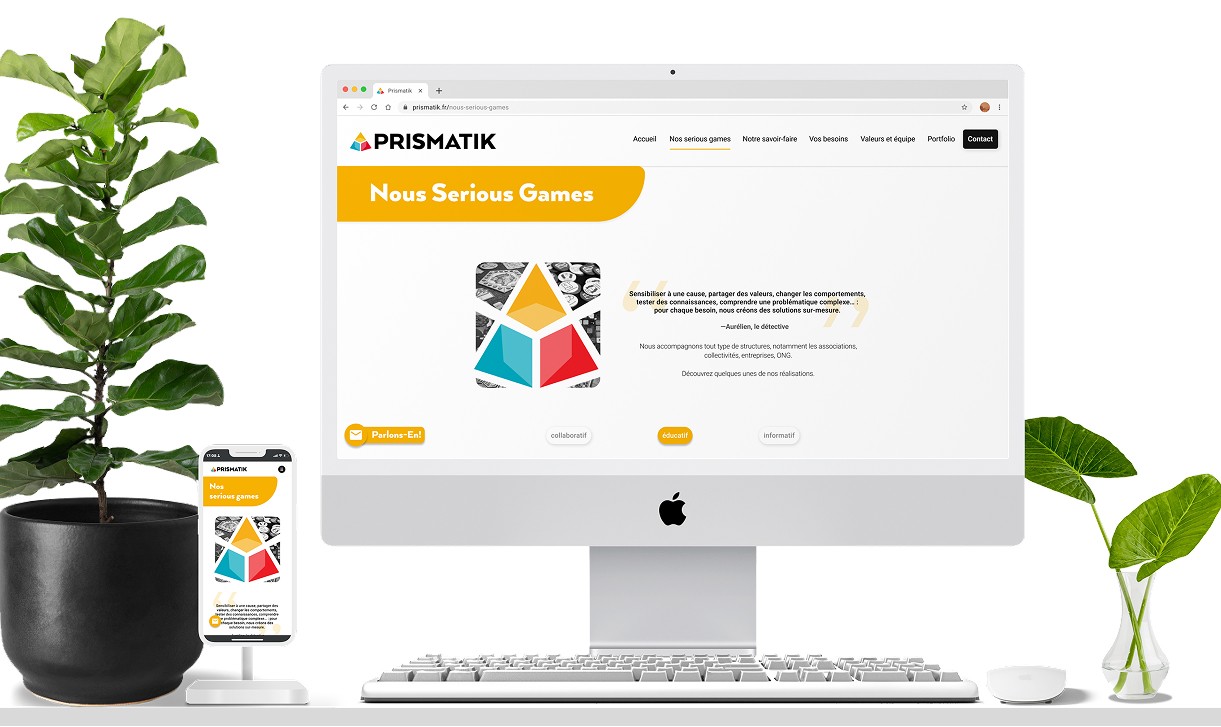
Adding filter feature
+) 40% of the testers felt this feature would allow them to easily find their perfect product
+) Placing it on the top centre works better, despite most e-commerce stores placing it on the left panel
+) The right arrow worked better than the ellipsis icon to indicate there is more information
4.4 | Solution Part 1
Adding filter feature
+) 40% of the testers felt this feature would allow them to easily find their perfect product
+) Placing it on the top centre works better, despite most e-commerce stores placing it on the left panel
+) The right arrow worked better than the ellipsis icon to indicate there is more information
4.4 | Solution Part 1
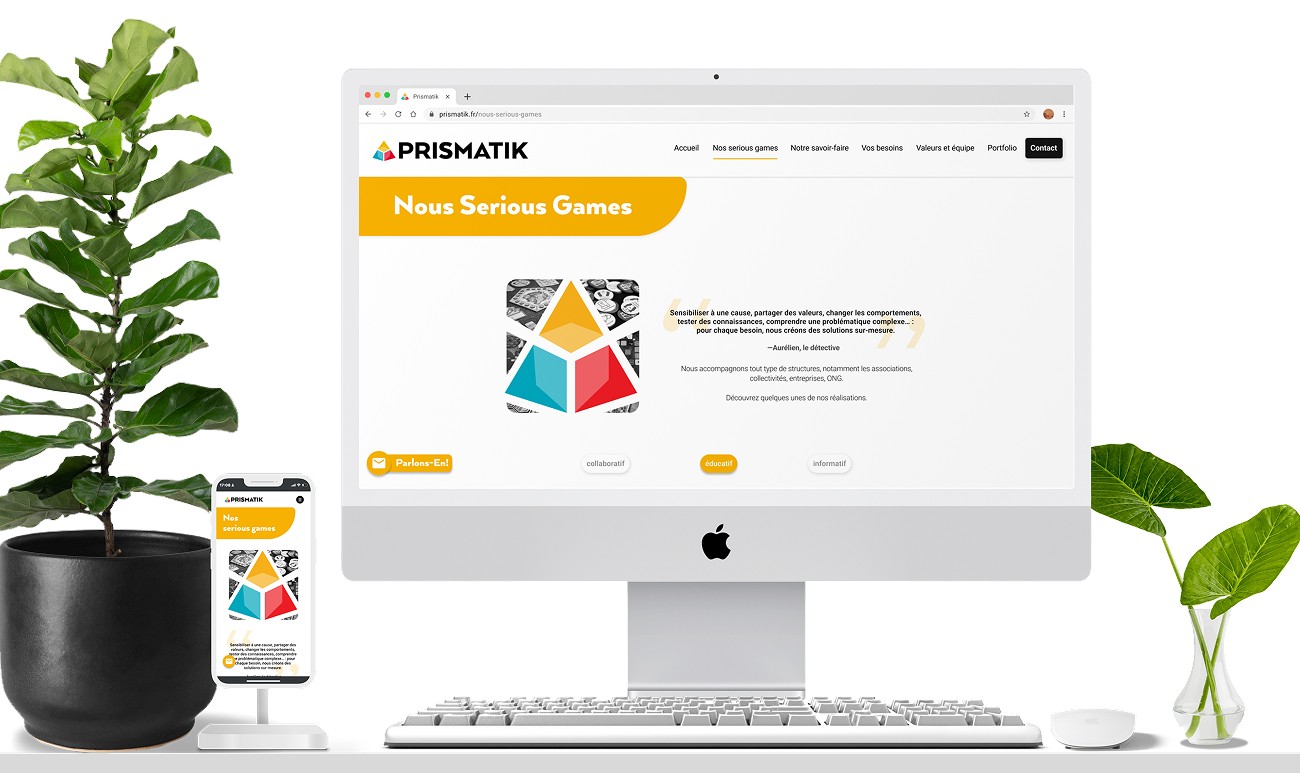
Adding filter feature
+) 40% of the testers felt this feature would allow them to easily find their perfect product
+) Placing it on the top centre works better, despite most e-commerce stores placing it on the left panel
+) The right arrow worked better than the ellipsis icon to indicate there is more information
4.4 | Solution Part 1
Adding filter feature
+) 40% of the testers felt this feature would allow them to easily find their perfect product
+) Placing it on the top centre works better, despite most e-commerce stores placing it on the left panel
+) The right arrow worked better than the ellipsis icon to indicate there is more information
4.4 | Solution Part 1
Adding filter feature
+) 40% of the testers felt this feature would allow them to easily find their perfect product
+) Placing it on the top centre works better, despite most e-commerce stores placing it on the left panel
+) The right arrow worked better than the ellipsis icon to indicate there is more information
4.4 | Solution Part 1
Adding filter feature
+) 40% of the testers felt this feature would allow them to easily find their perfect product
+) Placing it on the top centre works better, despite most e-commerce stores placing it on the left panel
+) The right arrow worked better than the ellipsis icon to indicate there is more information
4.5 | Solution Part 2
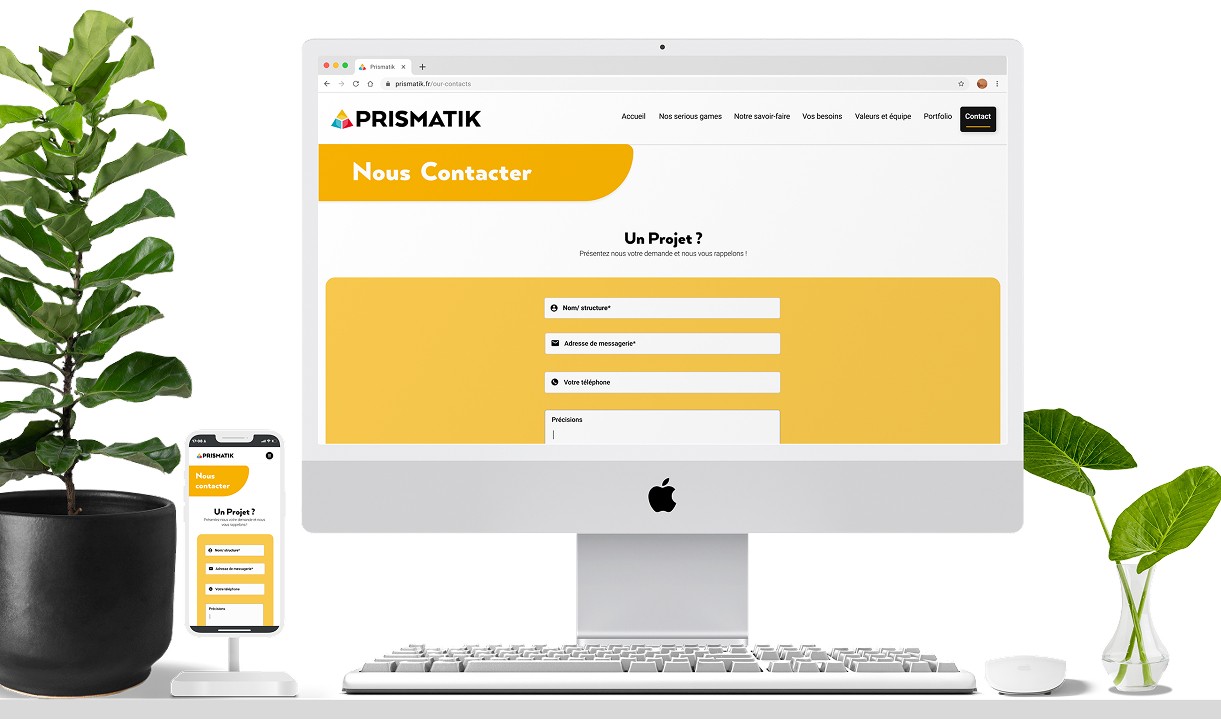
Interactive contact features
+) The hover effect shows more info. made the content feel more concise
+) 75% of the testers believe interactive features will improve the website’s user traffic
+) Having a contact icon fixed with a hover effect on every page encourages contact with Prismatik
4.5 | Solution Part 2
Interactive contact features
+) The hover effect shows more info. made the content feel more concise
+) 75% of the testers believe interactive features will improve the website’s user traffic
+) Having a contact icon fixed with a hover effect on every page encourages contact with Prismatik
4.5 | Solution Part 2
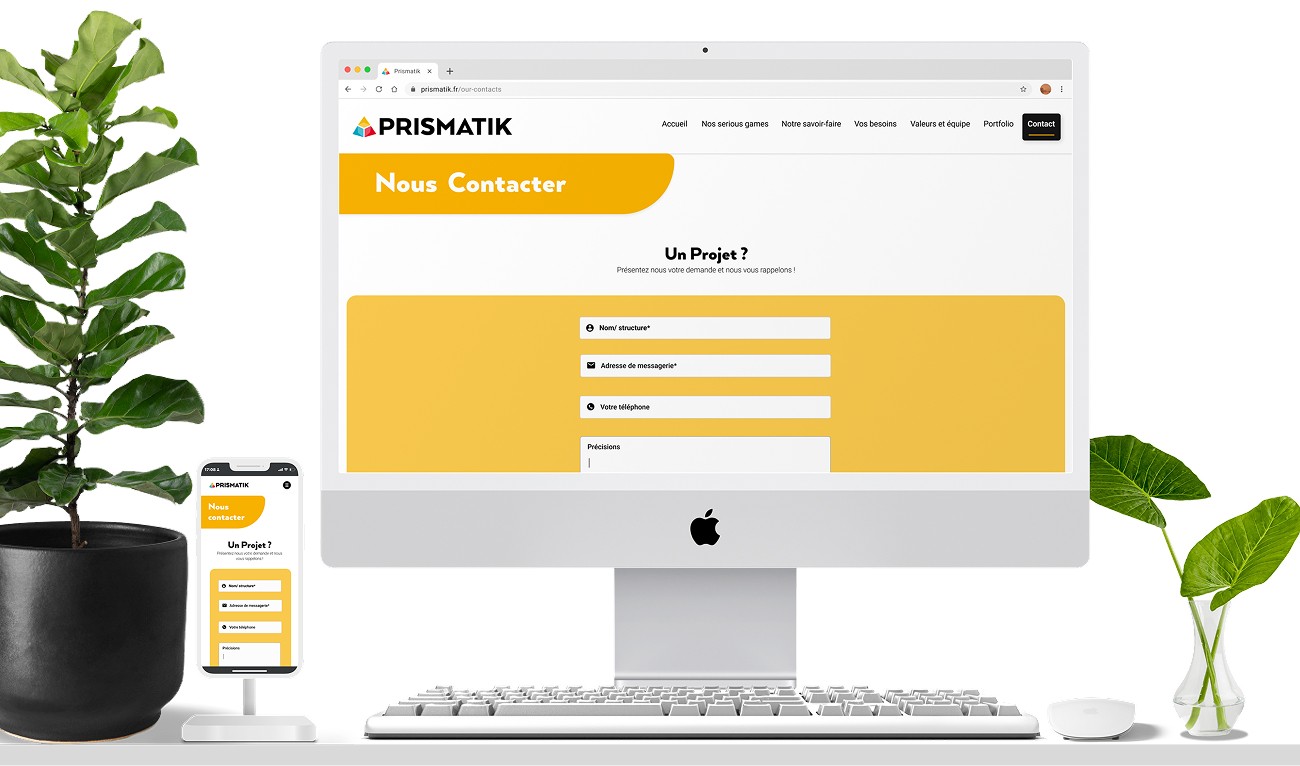
Interactive contact features
+) The hover effect shows more info. made the content feel more concise
+) 75% of the testers believe interactive features will improve the website’s user traffic
+) Having a contact icon fixed with a hover effect on every page encourages contact with Prismatik
4.5 | Solution Part 2
Interactive contact features
+) The hover effect shows more info. made the content feel more concise
+) 75% of the testers believe interactive features will improve the website’s user traffic
+) Having a contact icon fixed with a hover effect on every page encourages contact with Prismatik
4.5 | Solution Part 2
Interactive contact features
+) The hover effect shows more info. made the content feel more concise
+) 75% of the testers believe interactive features will improve the website’s user traffic
+) Having a contact icon fixed with a hover effect on every page encourages contact with Prismatik
4.5 | Solution Part 2
Interactive contact features
+) The hover effect shows more info. made the content feel more concise
+) 75% of the testers believe interactive features will improve the website’s user traffic
+) Having a contact icon fixed with a hover effect on every page encourages contact with Prismatik
4.6 | Solution Part 3
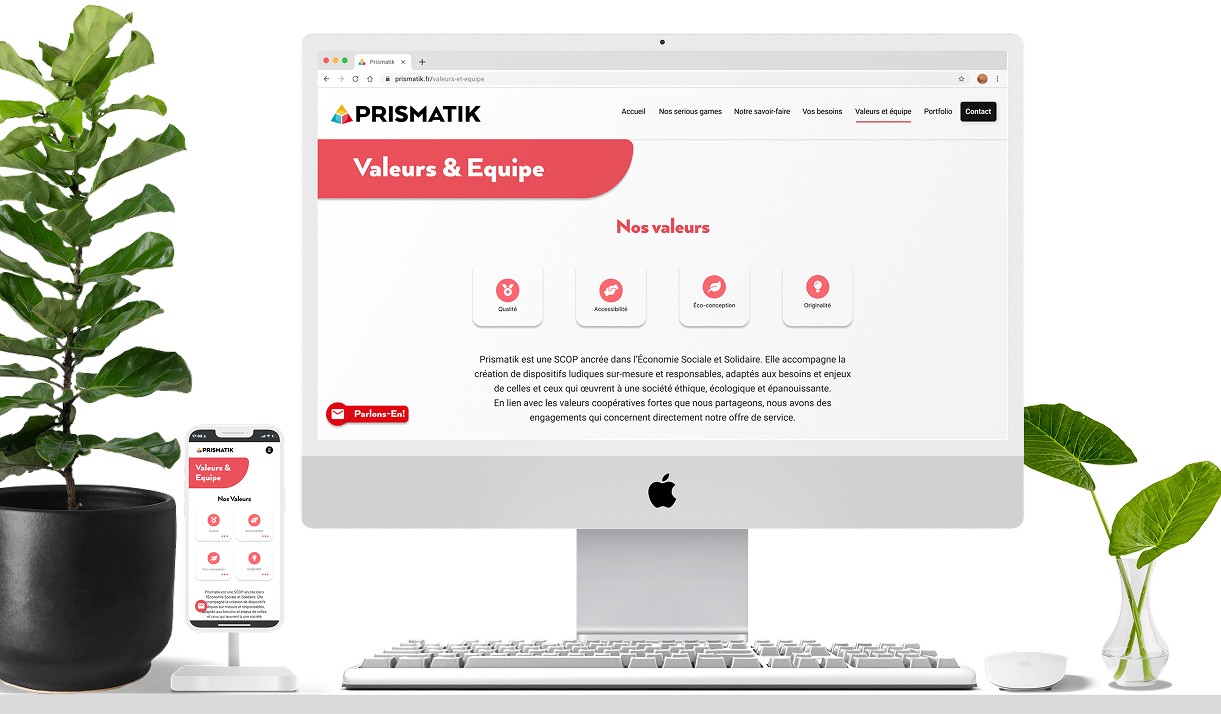
Responsive site
+) Desktop browser wireframes were essential, but outside the scope of the brief
+) By designing from mobile to desktop, the design makes the content more digestible
+) A responsive website is vital to improve the website's traffic of the website
4.6 | Solution Part 3
Responsive site
+) Desktop browser wireframes were essential, but outside the scope of the brief
+) By designing from mobile to desktop, the design makes the content more digestible
+) A responsive website is vital to improve the website's traffic of the website
4.6 | Solution Part 3
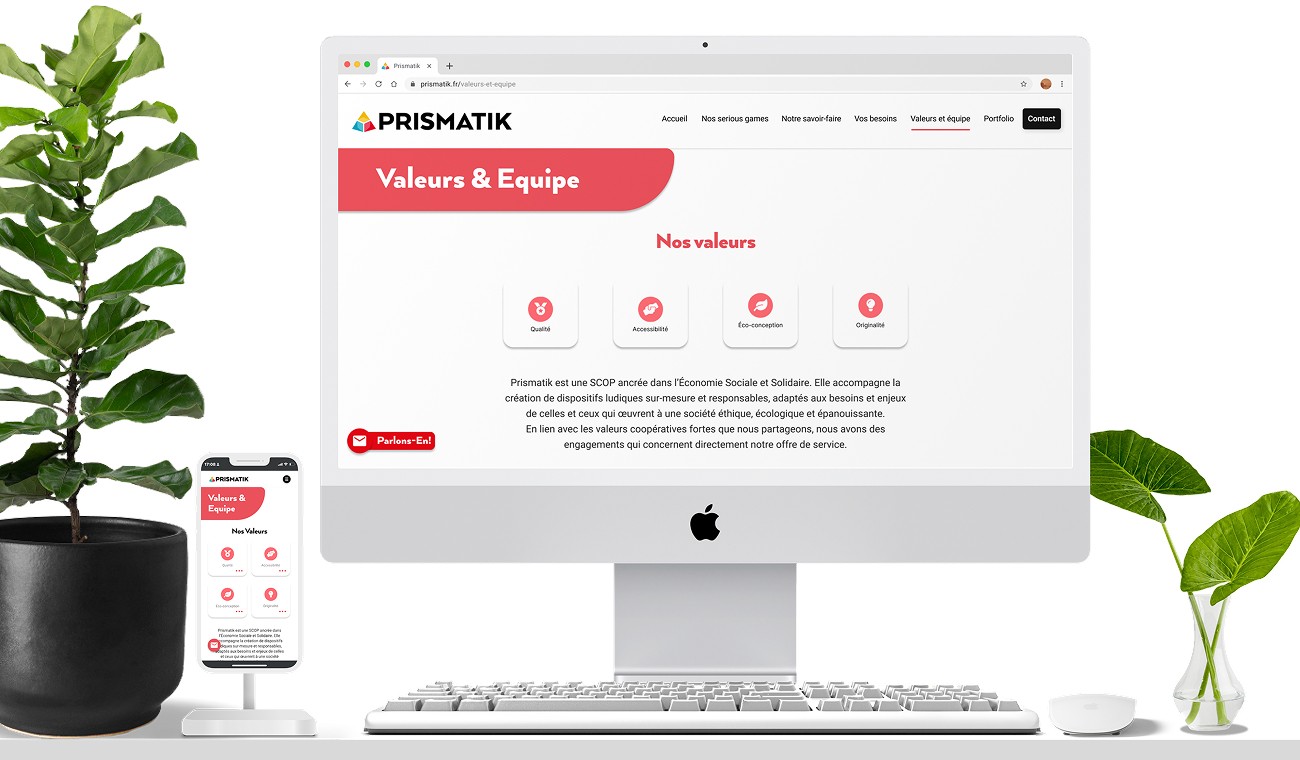
Responsive site
+) Desktop browser wireframes were essential, but outside the scope of the brief
+) By designing from mobile to desktop, the design makes the content more digestible
+) A responsive website is vital to improve the website's traffic of the website
4.6 | Solution Part 3
Responsive site
+) Desktop browser wireframes were essential, but outside the scope of the brief
+) By designing from mobile to desktop, the design makes the content more digestible
+) A responsive website is vital to improve the website's traffic of the website
4.6 | Solution Part 3
Responsive site
+) Desktop browser wireframes were essential, but outside the scope of the brief
+) By designing from mobile to desktop, the design makes the content more digestible
+) A responsive website is vital to improve the website's traffic of the website
4.6 | Solution Part 3
Responsive site
+) Desktop browser wireframes were essential, but outside the scope of the brief
+) By designing from mobile to desktop, the design makes the content more digestible
+) A responsive website is vital to improve the website's traffic of the website
5.0 | Reflections
5.0 | Reflections
5.0 | Reflections
The End of this Case Study
The End of this Case Study
The End of this Case Study
The End of this Case Study
Redesigning Prismatik’s mobile-to-desktop experience was a fast-paced and collaborative project that challenged me to think clearly, iterate quickly, and stay user-focused. Working under tight constraints gave me valuable clarity on my design process. These are the reflections that shaped my learning.
Redesigning Prismatik’s mobile-to-desktop experience was a fast-paced and collaborative project that challenged me to think clearly, iterate quickly, and stay user-focused. Working under tight constraints gave me valuable clarity on my design process. These are the reflections that shaped my learning.
Redesigning Prismatik’s mobile-to-desktop experience was a fast-paced and collaborative project that challenged me to think clearly, iterate quickly, and stay user-focused. Working under tight constraints gave me valuable clarity on my design process. These are the reflections that shaped my learning.
Redesigning Prismatik’s mobile-to-desktop experience was a fast-paced and collaborative project that challenged me to think clearly, iterate quickly, and stay user-focused. Working under tight constraints gave me valuable clarity on my design process. These are the reflections that shaped my learning.
5.1 | The Key Impacts
⚡
Improved Clarity
Usability testing showed a 42% increase in perceived clarity of the mobile-to-desktop flow, helping users understand Prismatik’s service more quickly.
⚡
Reduced Cognitive Load
Simplified hierarchy and responsive layout contributed to a 33% reduction in navigation errors, helping users stay focused on content instead of the interface.
⚡
Higher Engagement
Useberry analytics revealed a 36% increase in engagement with redesigned UI components, reflecting stronger comprehension and smoother interaction.
5.2 | The Lessons Learned
💡
Prioritise B2B Clarity
Usability feedback confirmed that business users respond best to clear, direct interfaces over stylistic experimentation.
💡
Have Style Guides Ready
Working within Prismatik’s style guide strengthened design decisions and made it easier to maintain a consistent visual structure across the entire experience.
💡
Test Early, Adjust Fast
Early prototype testing highlighted navigation gaps sooner and enabled quicker alignment across the mobile-to-desktop flow.
5.3 | The Next Steps
🚀
Finalise Responsive Build
The next phase is to collaborate with developers to translate the refined layouts into a fully responsive implementation across all breakpoints in the system.
🚀
More Accessibility Controls
Future iterations should introduce advanced accessibility controls that help users customise their board-creation process with greater confidence and clarity.
🚀
Add AI chatbot
A lightweight chatbot could streamline onboarding and guide users through key actions, improving completion rates and reducing friction during setup.
5.1 | The Key Impacts

Improved Clarity
Usability testing showed a 42% increase in perceived clarity of the mobile-to-desktop flow, helping users understand Prismatik’s service more quickly.
Reduced Cognitive Load
Simplified hierarchy and responsive layout contributed to a 33% reduction in navigation errors, helping users stay focused on content instead of the interface.
Higher Engagement
Useberry analytics revealed a 36% increase in engagement with redesigned UI components, reflecting stronger comprehension and smoother interaction.
5.2 | The Lessons Learned

Prioritise B2B Clarity
Usability feedback confirmed that business users respond best to clear, direct interfaces over stylistic experimentation.
Have Style Guides Ready
Working within Prismatik’s style guide strengthened design decisions and made it easier to maintain a consistent visual structure across the entire experience.
Test Early, Adjust Fast
Early prototype testing highlighted navigation gaps sooner and enabled quicker alignment across the mobile-to-desktop flow.
5.3 | The Next Steps

Finalise Responsive Build
The next phase is to collaborate with developers to translate the refined layouts into a fully responsive implementation across all breakpoints in the system.
More Accessibility Controls
Future iterations should introduce advanced accessibility controls that help users customise their board-creation process with greater confidence and clarity.
Add AI chatbot
A lightweight chatbot could streamline onboarding and guide users through key actions, improving completion rates and reducing friction during setup.
5.1 | The Key Impacts
⚡
Improved Clarity
Usability testing showed a 42% increase in perceived clarity of the mobile-to-desktop flow, helping users understand Prismatik’s service more quickly.
⚡
Reduced Cognitive Load
Simplified hierarchy and responsive layout contributed to a 33% reduction in navigation errors, helping users stay focused on content instead of the interface.
⚡
Higher Engagement
Useberry analytics revealed a 36% increase in engagement with redesigned UI components, reflecting stronger comprehension and smoother interaction.
5.2 | The Lessons Learned
💡
Prioritise B2B Clarity
Usability feedback confirmed that business users respond best to clear, direct interfaces over stylistic experimentation.
💡
Have Style Guides Ready
Working within Prismatik’s style guide strengthened design decisions and made it easier to maintain a consistent visual structure across the entire experience.
💡
Test Early, Adjust Fast
Early prototype testing highlighted navigation gaps sooner and enabled quicker alignment across the mobile-to-desktop flow.
5.3 | The Next Steps
🚀
Finalise Responsive Build
The next phase is to collaborate with developers to translate the refined layouts into a fully responsive implementation across all breakpoints in the system.
🚀
More Accessibility Controls
Future iterations should introduce advanced accessibility controls that help users customise their board-creation process with greater confidence and clarity.
🚀
Add AI chatbot
A lightweight chatbot could streamline onboarding and guide users through key actions, improving completion rates and reducing friction during setup.
5.1 | The Key Impacts
⚡
Improved Clarity
Usability testing showed a 42% increase in perceived clarity of the mobile-to-desktop flow, helping users understand Prismatik’s service more quickly.
⚡
Reduced Cognitive Load
Simplified hierarchy and responsive layout contributed to a 33% reduction in navigation errors, helping users stay focused on content instead of the interface.
⚡
Higher Engagement
Useberry analytics revealed a 36% increase in engagement with redesigned UI components, reflecting stronger comprehension and smoother interaction.
5.2 | The Lessons Learned
💡
Prioritise B2B Clarity
Usability feedback confirmed that business users respond best to clear, direct interfaces over stylistic experimentation.
💡
Have Style Guides Ready
Working within Prismatik’s style guide strengthened design decisions and made it easier to maintain a consistent visual structure across the entire experience.
💡
Test Early, Adjust Fast
Early prototype testing highlighted navigation gaps sooner and enabled quicker alignment across the mobile-to-desktop flow.
5.3 | The Next Steps
🚀
Finalise Responsive Build
The next phase is to collaborate with developers to translate the refined layouts into a fully responsive implementation across all breakpoints in the system.
🚀
More Accessibility Controls
Future iterations should introduce advanced accessibility controls that help users customise their board-creation process with greater confidence and clarity.
🚀
Add AI chatbot
A lightweight chatbot could streamline onboarding and guide users through key actions, improving completion rates and reducing friction during setup.
5.1 | The Key Impacts
⚡
Improved Clarity
Usability testing showed a 42% increase in perceived clarity of the mobile-to-desktop flow, helping users understand Prismatik’s service more quickly.
⚡
Reduced Cognitive Load
Simplified hierarchy and responsive layout contributed to a 33% reduction in navigation errors, helping users stay focused on content instead of the interface.
⚡
Higher Engagement
Useberry analytics revealed a 36% increase in engagement with redesigned UI components, reflecting stronger comprehension and smoother interaction.
5.2 | The Lessons Learned
💡
Prioritise B2B Clarity
Usability feedback confirmed that business users respond best to clear, direct interfaces over stylistic experimentation.
💡
Have Style Guides Ready
Working within Prismatik’s style guide strengthened design decisions and made it easier to maintain a consistent visual structure across the entire experience.
💡
Test Early, Adjust Fast
Early prototype testing highlighted navigation gaps sooner and enabled quicker alignment across the mobile-to-desktop flow.
5.3 | The Next Steps
🚀
Finalise Responsive Build
The next phase is to collaborate with developers to translate the refined layouts into a fully responsive implementation across all breakpoints in the system.
🚀
More Accessibility Controls
Future iterations should introduce advanced accessibility controls that help users customise their board-creation process with greater confidence and clarity.
🚀
Add AI chatbot
A lightweight chatbot could streamline onboarding and guide users through key actions, improving completion rates and reducing friction during setup.
5.1 | The Key Impacts
Improved Clarity
Usability testing showed a 42% increase in perceived clarity of the mobile-to-desktop flow, helping users understand Prismatik’s service more quickly.
Reduced Cognitive Load
Simplified hierarchy and responsive layout contributed to a 33% reduction in navigation errors, helping users stay focused on content instead of the interface.
Higher Engagement
Useberry analytics revealed a 36% increase in engagement with redesigned UI components, reflecting stronger comprehension and smoother interaction.
5.2 | The Lessons Learned
Prioritise B2B Clarity
Usability feedback confirmed that business users respond best to clear, direct interfaces over stylistic experimentation.
Have Style Guides Ready
Working within Prismatik’s style guide strengthened design decisions and made it easier to maintain a consistent visual structure across the entire experience.
Test Early, Adjust Fast
Early prototype testing highlighted navigation gaps sooner and enabled quicker alignment across the mobile-to-desktop flow.
5.3 | The Next Steps
Finalise Responsive Build
The next phase is to collaborate with developers to translate the refined layouts into a fully responsive implementation across all breakpoints in the system.
More Accessibility Controls
Future iterations should introduce advanced accessibility controls that help users customise their board-creation process with greater confidence and clarity.
Add AI chatbot
A lightweight chatbot could streamline onboarding and guide users through key actions, improving completion rates and reducing friction during setup.
Thanks for stopping by! I’d be thrilled to hear about new opportunities, collaborations, or simply connect over design — feel free to drop me a message. I’ll get back to you as soon as I can.

2026 Dipali Vassantrai. All Rights Reserved. Privacy & Cookies.
2026 Dipali Vassantrai. All Rights Reserved. Privacy & Cookies.
Thanks for stopping by! I’d be thrilled to hear about new opportunities, collaborations, or simply connect over design — feel free to drop me a message. I’ll get back to you as soon as I can.
2026 Dipali Vassantrai. All Rights Reserved. Privacy & Cookies.
2026 Dipali Vassantrai. All Rights Reserved. Privacy & Cookies.